Saturday, 15 September 2007

Problems with Nero 7 in Windows Vista Ultimate x64

I have had a number of issues in getting my favourite burning program, Nero 7, working in Windows Vista Ultimate x64. These are:


1. Every time I login I receive a message "Nero Home Has Stopped Responding". When I click to end this process, it obviously starts again because the message keeps repeating forever.
I have opened a support call with Nero about this but no progress so far. My work round is to kill the processes "WerFault.exe *32" and "NMBgMonitor.exe" in Task Manager. I have further used MSConfig to disable Nero Home on the Startup tab.


2. In Media Centre, selecting the Nero plug-in causes an "Invalid Application Error".
I have also passed this to Nero, but again no response as yet. I am using MCEBuddy to automatically convert Media Centre recordings to WMV files and then burning using standard DVD creation programs. This saves me disk space and gives me more control anyway so I am not that bothered.


3. When trying to burn a DVD or CD with Nero Burning ROM, I get a message saying "The Server is Busy. This action cannot be completed.....".
I believe that this is related to problem 1 above. I killed all the NM* processes in task manager and Nero was able to open the burning dialog OK. The processes did keep restarting, so I have used Computer Management to disable the NMIndexingService service. I may have to kill these NM* processes manually again next time but at least I can get Nero to work.


At the moment, I have the latest version of Nero 7 available from the Nero website: 7.10.1.0


Update: Ahead came up with a patched DLL but this has not fixed the problem for me.


Update 2: Just had an email from Ahead to confirm that this is a known and fixed issue that is fixed in the next release. Unfortunately, they could not give me the date for the next release. :(

Wednesday, 12 September 2007

Extracting WMV from MCE

I initially tried playing with DVRMSToolbox, but it had some significant issues wwth Vista 64. (Would not convert to WMV and Commercial skipping not working in Media Centre).

I found another tool called MCE Buddy. This is not as flexible as DVRMSToolbox but it just works!

You can find it here:
http://www.mcebuddy.com/

How to Enable Versbose Startup\Shutodown\Logon\Logoff Messages in Windows XP

Create HKLM\Software\Microsoft\Windows\CurrentVersion\Policies\System\verbosestatus
It needs to be Dword with a value of 0x1.

Tuesday, 11 September 2007

BBC iPlayer on Windows Vista

I had worked out sometime ago how to install Sky Anytime onto my Laptop (useful for those stays away), but I wanted to install the BBC iPlayer back onto my desktop after an upgrade to Windows Vista (I have no need for 4OD as it is delivered through my Virgin Media cable).

It turns out that all you have to do is to change the user agent (UA) strings to fool the BBC website into letting you download the iPlayer.

I found details on how to do it here:
http://community.plus.net/comms/2007/08/02/how-to-install-the-bbc-iplayer-on-windows-vista/

You can download the UA registry changes from here:
http://www.fiddlertool.com/useragent.aspx


Update:
You can only play the DRM files if you have administrative rights.


Update2:
I've found the download from Microsoft called "User Agent String Utility" to be a better long-term choice. This allows you to open a copy of IE7 configured to react like IE6. You can then use this to access the BBC iPlayer site. Get it here.

Update to CS 2.1 SP3

Please let me know of any problems.

I am actually a couple of versions behind because CS 2007 SP2 is out.

Synchronise Media from Media Centre to External Storage on XDA Orbit

Since installing Windows Vista Ultimate and a TV card on my desktop PC, I have been playing with Media Centre. Everything was working great except synchronising content to my Windows Mobile 5.0 device (an O2 XDA Orbit).

I was only being offered the change to synchronise to the internal storage of the device. The XDA Orbit has just 64MB of internal storage, of which I only have 14MB free. You can't fit much on there!

It turns out that this is a bug with Media Centre not resolving device names correctly. The fix isn't currently delivered by Windows\Microsoft update, but once I had identified and installed it, everything worked fine.

I've not yet worked out how to synch individual programs from MCE so I still have issues with running out of storage on my 1GB card. I've seen reports that 2GB is the max I can use although some claim 4GB - I see a trip to ebay in my future! I also feel I get more control with Nero recode so I guess it would be great if you could extract WMV files from MCE, anyone know how?

I found the bug described here:
http://www.tabletquestions.com/windows-vista/9396-windows-mobile-device-center-media-center-pocket-pc-sync.html

I found the KB931621 fix here:
http://support.microsoft.com/kb/931621/en-us


Update:
Nero can process the dvr-ms files directly (at least with the Vista codec pack I have installed). You find them in C:\Users\Publix\Recorded TV.

Thursday, 19 July 2007

Greylisting on Exchange 2003

A massive increase in Spam, particularly PDF attached stock scams, has happened here recently.

I decided to look for something different and found this free Greylisting product for Exchange 2000\2003.

Wednesday, 18 July 2007

VMWare Server v1.0.3 unable to bridge to wireless network on Vista

I've been trying to test some printing configurations on SLES 10 SP1 but I couldn't get my laptop running Windows Vista Ultimate and VMWare Server v1.0.3 to successfully bridge onto the wireless adaptor.

I could use NAT but then it was difficult to test connectivity to the server.

Having hunted around a bit I found this useful post: Abstract path:VMWare, Wireless Network Adapter and Bridging

This pointed to a VMWare article which allows the Vista adaptor bridging feature to be enabled between the onboard wireless card and the virtual adaptor created by VMware.

Before this fix I could only contact the host wireless IP address, now I can connect to everything but! If anyone knows how to get the VMWare native bridging feature to work, please get in touch.

N.B. The only step missing from the above articles was that you must create a VMware virtual adaptor (I used adapator #2) and delete the DHCP scope for it. Fail to do the and you will leak DHCP onto your wireless network!

SkyAnywhere on Vista?

SkyAnywhere has been running well on my laptop for sometime. I had to flag it to run as an administrator but everything worked.

Today it insisted on downloading an update when I fancied watching a film, but then refused to run it because my machine wasn't running XP.

After a search I found this thread which allowed me to run it again!

Friday, 6 April 2007

How to Display SCL (Spam Confidence Level) in Outlook 2007

Firstly, download and install this Exchange Event Sink as described here:
http://www.ivasoft.biz/showscl.shtml

Secondly, create a custom formula field to display the SCL as described here:
http://forums.microsoft.com/TechNet/ShowPost.aspx?PostID=739718&SiteID=17

The use of Right([Comments],5,2) allows an SCL of -1 through 9 to display correctly.

Of course, if you are using Outlook 2007 with Exchange 2007 you can see the Spam score by looking at the Internet headers - I have not seen a method to display this on the Outlook email list page yet.
http://technet.microsoft.com/en-us/library/bb124595.aspx

Tuesday, 3 April 2007

Downgrade Exchange 2007 B2 to Exchange 2003 SP2

Oh, what fun and games I had.

First I backed up all the mail:
  • Outlook export to PST
  • ExMerge (Hey - It worked on Exchange 2007!)
  • NT Backup of store
Then I removed Exchange 2007 and reininstalled Exchange 2003 - Except it didn't quite go that smooth,

The installation errored saying that it could not install the information store and to check the install log. I found this error message:
mode = 'Install' (61953) CBaseAtom::ScSetup (f:\titanium\admin\src\udog\setupbase\basecomp\baseatom.cxx:842)
Error code 0XC00736B1 (14001): This application has failed to start because the application configuration is incorrect. Reinstalling the application may fix this problem.


Tracing back up the install log found this message:
Interpreting line -- ID:31259 --
CInsParser::ScProcessLine (f:\titanium\admin\src\libs\exsetup\hiddenw1.cxx:1225)
Error code 0XC00736B1 (14001): This application has failed to start because the application configuration is incorrect. Reinstalling the application may fix this problem.


Tracing back futher led to this line:
Copying c:\program files\common files\microsoft shared\cdo\cdoex.dll
Preserving existing copy of c:\program files\common files\microsoft shared\cdo\cdoex.dll

Sure enough, typing "regsvr32 c:\program files\common files\microsoft shared\cdo\cdoex.dll" produced the same error code.

I deleted the copy of cdoex.dll and replaced it with the copy from the Exchange Server 2003 CD and re-ran the regsvr32 command - It worked. I clicked "Retry" and the install completed.

I did receive an error message about the wrong version of mapi32.dll being on the hard disk so I also replaced from the CD too.

Applied Exchange 2003 SP2 and visited Microsoft update to apply some hot fixes and everything appears to be working well.

Blog Outage

Sorry for the outage - I needed to remove Exchange Server 2007 B2 from my test server and return to Exchange 2003 SP2.  This did not go smoothly and I had to do a lot of troubleshooting.
Part of this troubleshooting involved removing IIS (and all the wen sites with it) which brole ASP.NET 2.0 and everthing that relied on it.
Everything is installed and working again (except my ISP connection is down).
Everything should be back to normal.

Thursday, 4 January 2007

Update to CS 2.1 SP2

Updated to CS 2.1 SP2 today. Please let me know of any problems.

Friday, 1 December 2006

ebay Broken?

Good start to the day, I need to buy some stuff for Christmas and ebay seems broken for me:

That's happening for every item so I wonder how much money they are losing?
Managed to see the item a few seconds later, bought it, but got this:

Wednesday, 29 November 2006

Linux NIC Bonding

I had a query on how to setup NIC bonding in RHEL4 so thought I would document it for the blog.

I'll start with a standard server with 2 NICs, eth0 and eth1. Here is the output from 'ifconfig':


The configuration scripts are found in /etc/sysconfig/network/network/scripts:


eth0 is a static interface configured in /etc/sysconfig/network/network-scripts/ifcfg-eth0:


eth1 is a static interface configured in /etc/sysconfig/network/network-scripts/ifcfg-eth1

The hardware is configured in /etc/modprobe.conf:


First we add a config file for bond0, /etc/sysconfig/network/network-scripts/ifcfg-bond0:


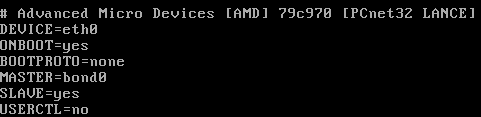
Now we edit /etc/sysconfig/network/network-scripts/ifcfg-eth0:


Now we edit /etc/sysconfig/network/network-scripts/ifcfg-eth1:

Network scripts are now complete in /etc/sysconfig/network/network-scripts:


Add the bonding driver to /etc/modprobe.conf:


Shut down the network with 'service network stop'
Insert the bonding driver with 'modprobe bonding -o bond0 miimon=100 mode=1'
Start the network with 'service network start':

Check the interfaces with 'ifconfig':


Check the routing is ok with 'route -n':


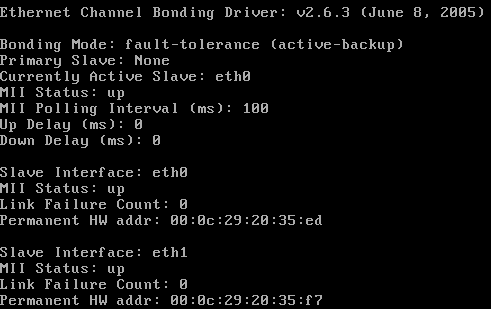
View the status with 'cat /proc/net/bonding/bond0':


Tuesday, 28 November 2006

IE7 Download Corruption

I have a particular file that I needed to download but IE7 consistantly corrupts it. It works fine with Firefox 2 and Free Download Manager. There is a strange dialog at the end of the download. This is a Print Screen capture:


It's not quite accurate because the progress bar is still there on the screen and there is a quarter of a (close?) button at the right hand end of the of where the progress bar would end.


I took a photo because I didn't seem able to Print Screen the dialog properly (bits were missing as above)

Friday, 24 November 2006

The Office Open XML file Building Blocks.dotx cannot be opened because there are problems with contents

I had a real problem with B2 Technical Refresh of Office 2007 not allowing me to insert page numbers, giving me the error message "The Office Open XML file Building Blocks.dotx cannot be opened because there are problems with contents."

Thanks to "PJ-DJ" I found the answer here:
http://forums.microsoft.com/TechNet/ShowPost.aspx?PostID=932036&SiteID=17

Step 1: Close Word and Outlook if you are using Word as your email editor.
Step 2: Go to C:\Documents and Settings\(Username)\Application Data\Microsoft\Document Building Blocks\1033 and delete the Building Blocks.dotx file.
Step 3: Open Word. CLOSE IT AGAIN. Wait a few seconds.
Step 4: Open Word. On a blank document, Insert Page Numbers. Check your C:\Documents and Settings\(Username)\Application Data\Microsoft\Document Building Blocks\1033 folder. A new Building Blocks.dotx file should have been created.
Step 5: There is no Step 5. You should be fine now.


I really must get that licensed copy of Office 2007 installed - But I'm not sure if Sharepoint designer is released?

Thursday, 23 November 2006

Gissa Job?

Things aren't going too well at work - The direction the company wants to take and the direction I want to take do not match!

Anyone need a technical type of guy?

I prefer to work around the Ipswich, Suffolk area and you can find a general purpose CV in PDF format here.

If you need it in another format, give me a shout.

Sunday, 12 November 2006

CS 2.1 SP 1 Fixed Comment Review Problem

I've just applied CS 2.1 SP1 and it fixed my comment review problem described earlier. [:D]

Saturday, 28 October 2006

CS2.1 Review Comments does not display correctly in IE7

I have to review comments before I allow them to be posted on the site because, as all blog owners know, you get a lot of spam comments. IE7 doesn't want to let me review them in lower resolutions. I get a cut off review line with no horizontal scroll bar. See what I mean here.

Firefox 2.0 fares better. It wraps the comment line and lets me scroll the windows horizontally if I have a long comment title. The colours are a little bit weird but I can live with that. See how Firefox 2.0 copes here.

I've posted a bug to the support forum so lets see how that does.