Thursday, 14 August 2008

Network connection keeps stopping in Windows Vista Ultimate x64

I've recently had an issue with my main desktop machine losing network connectivity overnight. No other machines are affected, only my desktop one. The problem computer is connected via wired ethernet to a Netgear GS105 Gigabit switch. The lights on the switch stay on, so there appears to be nothing wrong with the physical connection but the system still can contact nothing on the network.

What has worked as a fix, was to go into the network connections, disable and then enable the LAN connection. The computer will then work fine for another 24 hours.

After some searching, I read this:
http://forums.techarena.in/vista-help/791873.htm

Which then led to this:
http://support.microsoft.com/kb/927168

Now, each time the connection has stopped working, I have had my Windows Mobile 6.0 phone plugged in, synchronising and charging. I wondered if this was the same as Internet Connection Sharing as the phone is given an IP and can access the network via my desktop computer. When I had network problems with my network camera, I do remember switching on RSS (receive side scaling) as part of the changes made to the IP stack.

I've disabled RSS for now using the command:
netsh interface tcp set global rss=disabled


I'll followup with any further lockups or not!

Tuesday, 29 July 2008

Poor performance with D-Link DCS-6620G and Microsoft Windows Vista - Solved

I recently bought a D-Link DCS-6620G IP camera to replace a failed Panasonic one. I found the performance to be terrible. After running a network capture I discovered the following:

My Vista desktop would send two TCP SYN requests with ECN and CWR flags set.
The camera would resond to each of these with a TCP RST.
My Vista desktop would then send a TCP SYN request without ECN and CWR flags and the camera would then respond normally.

This problem also meant that I could not add the camera to D-Link D-ViewCam Monitor as the request to add a camera failed with an unable to connect message.

After a bit of reading, I discovered the CWR and ECN flags were being set because I had ECN enabled in my IP stack. I verified this by running:
netsh interface tcp show global
Querying active state...
TCP Global Parameters
----------------------------------------------
Receive-Side Scaling State          : enabled
Chimney Offload State               : disabled
Receive Window Auto-Tuning Level    : disabled
Add-On Congestion Control Provider  : none
ECN Capability                      : enabled
RFC 1323 Timestamps                 : disabled
Running the following, disabled the setting:
netsh interface tcp set global ecncapability=disabled
Ok.
And...
netsh interface tcp show global
Querying active state...
TCP Global Parameters
----------------------------------------------
Receive-Side Scaling State          : enabled
Chimney Offload State               : disabled
Receive Window Auto-Tuning Level    : disabled
Add-On Congestion Control Provider  : none
ECN Capability                      : disabled
RFC 1323 Timestamps                 : disabled
The camera is now working very well.

Saturday, 12 July 2008

Microsoft DPM 2007 - Enable colocation of data on tape

If you have multiple storage groups with the same data retention policies, you can now colocate the data on the same tapes as long as you have installed theDPM 2007 feature pack. Most useful if you have a single drive rather than a library.

It's not settable in the GUI, but the following Powershell command turns it on:
Set-DPMGlobalProperty -DpmServer -OptimizeTapeUsage $true

More details here

Thursday, 10 July 2008

Update Rollup 3 for Exchange Server 2007 Service Pack 1

This (KB949870), was applied by Windows Update last night, and I woke up to no incoming email. On investigation, I found that there was no smtp (25) port open, and that the Microsoft Exchange Transport hadn't started after the reboot.

I attempted to manually start the service, but no joy as it timed out after 30 seconds. I reviewed the event logs, nothing there, tried again and it worked. Did a trawl back through the event logs when the server restarted, and again nothing. There were some eventid 3001\3003 from the EvntAgnt (log file not at end) so I may be missing some logs.

The only other issue I can think of, is that this is a single server Exchange 2007 installation - I.e. The transport service is running on the same server as the mailboxes rather than on a separate edge server. I would think this receives no testing by Microsoft!

I will have to monitor this the next time I reboot. Is anyone else having this issue?

DPM 2007 Feature Pack - Out!

The feature pack that is supposed to fix quite a few issues was released on the 1st July. I seemed to have missed it even though my DPM server is subscribed to Windows Update.

Found out about it here:
http://blogs.technet.com/dpm/archive/2008/07/01/dpm-2007-rollup-update-now-available.aspx

Details from Microsoft here:
http://www.microsoft.com/downloads/details.aspx?FamilyID=e9e1fe35-b175-40a8-8378-2f306ccc9e28&DisplayLang=en
http://www.microsoft.com/downloads/details.aspx?FamilyID=ad5cd1a2-9b87-4a2c-90a2-9dbaf1024310&DisplayLang=en

Saturday, 5 July 2008

Configure Server 2008 Time

I used the command:
"w32tm /config /manualpeerlist:"uk.pool.ntp.org europe.pool.ntp.org" /syncfromflags:manual /reliable:yes /update"

More details here:
http://technet2.microsoft.com/windowsserver/en/library/f3d6b66c-5fdc-4a77-a901-5efbcb4d4bb71033.mspx?mfr=true

Friday, 20 June 2008

Active directory permissions inheritance being cleared

I've been having an issue for some time where certain users and groups were having thier AD inheritance flag cleared and an arbitary set of permissions made.

It turns out that this is by design. Because the users belonged to a group, which belonged to Print Operators, thier permissions were being set to match the System\AdminSDHolder object. The PDC emulator runs an hourly process which copies the permissions from AdminSDHolder to these protected objects.

The following article describes how to remove Print Operators from this protected list of groups. The article talks about a hotfix, but this is only relevent for Windows 2003 SP1. Windows 2003 SP2 already has this change.

You can find the article here:
http://support.microsoft.com/kb/817433/en-us

Sunday, 15 June 2008

A couple of great Media Center addons


Just wanted to share a couple of excellent Media Center addons I have found recently
.
The first, called WebGuide4, allows you to access your Media Center PC through a web interface, including mobile:
http://www.asciiexpress.com/wiki/

The second allows access to BBC iPlayer, ITV Catch Up and Channel 4 Catch Up from within Media Center:
http://www.milliesoft.co.uk/index.php?option=com_content&view=article&id=9&Itemid=11

DPM 2007 Agent failing to protect Windows Vista SP1

I recently modifed my DPM 2007 installation to backup my local users folder on Windows Vista Ultimate x64. This would not work and kept producing the following event logs when I attemted to manually sync the share:
Log Name:      Application
Source:        Application Error
Date:          15/06/2008 08:50:37
Event ID:      1000
Task Category: (100)
Level:         Error
Keywords:      Classic
User:          N/A
Computer:      Cartman2.thefoleyhouse.co.uk
Description:
Faulting application DPMRA.exe, version 2.0.5820.0, time stamp 0x46f990f7, faulting module kernel32.dll, version 6.0.6001.18000, time stamp 0x4791ada5, exception code 0x80070002, fault offset 0x000000000002649d, process id 0x1ff8, application start time 0x01c8cebaac1ac7c8.
After some research I found the following fix:
http://www.eggheadcafe.com/software/aspnet/31450629/cant-create-recovery-poi.aspx

You have to create the following DWORD registry key with a value of 1:
HKLM\SYSTEM\CurrentControlSet\Control\Session Manager\kernel\obcaseinsensitive

Saturday, 14 June 2008

Windows Vista Ultimate x64 Component Registration Problem

My Media Center PC randomly decided to stop working. After a lot of searching and trying I finally found this:

http://mymce.wordpress.com/2006/11/30/a-component-registration-failurea-critical-process-failurea-tuner-not-found-error/

The steps were:

  1. Close Media Center
  2. Click on the Start menu, choose run and type cmd
  3. Execute the command regsvr32.exe atl.dll
  4. Execute the command C:\WINDOWS\eHome\ehSched /unregServer
  5. Execute the command C:\WINDOWS\eHome\ehSched /service
  6. Execute the command C:\WINDOWS\eHome\ehRecvr /unregServer
  7. Execute the command C:\WINDOWS\eHome\ehRecvr /service
  8. Execute the command C:\WINDOWS\eHome\ehRec.exe /unregServer
  9. Execute the command C:\WINDOWS\eHome\ehRec.exe /regserver
  10. Execute the command C:\WINDOWS\eHome\ehmsas.exe /unregServer
  11. Execute the command C:\WINDOWS\eHome\ehmsas.exe /regserver
  12. Restart Media Center

Thanks so much guys!

Sunday, 25 May 2008

DPM 2007 DPMRA Error 10048 (0x2740)

After rebooting my Exchange server because of DNS issue, the DPM protection stopped. Further investigation found this in the event log:
The DPMRA service terminated with service-specific error 10048 (0x2740).

Google found this:
http://support.microsoft.com/kb/947682

Essentialy you use 'netstat -oan' to find the PID of the process using port 5718 or 5719, which are both required by DPMRA.
Then use 'tasklist' and 'tasklist /svc' to discover which process it is. In my case, it was the MS Exchange Information Store.

I fixed it by stopping all Exchange services, starting DPMRA and then restarting Exchange.

It's kind of weird that MS Exchange can use the DPMRA ports when DPM is speciffically for protecting Exchange (amongst other things).

Thursday, 22 May 2008

How to re-create the Show Desktop icon on the Quick Launch toolbar

Create a text file called Show Desktop.scf containing:

[Shell]
Command=2
IconFile=explorer.exe,3
[Taskbar]
Command=ToggleDesktop

More details here:
http://support.microsoft.com/kb/190355/en-us

How to enable user environment debug logging in retail builds of Windows

I've found this quite useful in debugging slow logins or incorrect application of group policy.

Create the following DWORD value:
HKEY_LOCAL_MACHINE\Software\Microsoft\Windows NT\CurrentVersion\Winlogon\UserEnvDebugLevel

Set:
0x00030002 - Masses of debug info
0x00010001 - Normal

It logs to:
%Systemroot%\Debug\UserMode\Userenv.log

More details here:
http://support.microsoft.com/kb/221833

DPM 2007 Internal error code: 0x80990A93

When changing the PG (Protection Group) that my server belongs to, I normally get this error message:
DPM cannot protect \\CHEF2.thefoleyhouse.co.uk\Optical Drive\. The recycle bin, the System Volume Information folder, non-NTFS volumes, DFS links, CDs, Quorum Disk (for cluster) and other removable media cannot be protected. (ID: 38)

Today, it suddenly changed to:
DPM cannot access the path \\CHEF2.thefoleyhouse.co.uk\Optical Drive\ because part of the path has been deleted or renamed.
Check the path and enter it again.
ID: 36
Details: Internal error code: 0x80990A93

It took me a little while to realise that this was because I had removed the DVD from the drive! I thought I'd broken something by reinstalling the DPM client!

Tuesday, 20 May 2008

SQL Database missing from DPM 2007

Having fixed my SQL 2005 issues with DPM 2007, I found my main production SQL database was missing from the list of resources available to be protected. When attempting a normal SQL backup, I got an error message telling me that the Full Text Index was missing.

I recreated the Full Text Index, (got lost when changing SQL versions - No backup, that's what DPM was supposed to do!), and everything worked great.

The thing I learned here was, if DPM is having problems protecting a resource, try another backup type for more information on the error!

DPM SQL Issues

I had the following scenario:
  • DPM 2007 Running on Windows Server 2003 R2 SP2 (x86)
  • SQL 2005 Standard (x86) running on Windows Server 2008 (x64)
DPM would not protect the SQL databases, and kept giving errors that the protection was "inconsistant". There were lots of SQLVDI errors in event viewer, including a BADMEM error.
To cut a long story short, I found the fix was to replace the x86 version of SQL 2005 with an x64 version.

Windows Vista SP1 x64 - Multiple Taskeng processes consuming resources

I think I've found the cause, with not a little help, of all my multiple taskeng processes that have been plaguing my x64 SP1 Vitsa box:
  1. Open Task Scheduler from Administrative Tools
  2. Delete any User_Feed tasks
  3. Type 'msfeedssync enable' at the command line to recreate
http://forums.microsoft.com/TechNet/ShowPost.aspx?PostID=3087879&SiteID=17

Thanks guys!

Saturday, 16 February 2008

Blog Tags were not working

I've added the following to web.config to allow these to work:


I added it just before the  tag.

How-to Enable antispam updates on a single Exchange 2007 server

There is a handy little script that you can run from the Exchange Management Shell:
InstallAntispamAgents.ps1

To update manually:
Get-AntspamUpdates

To update automatically:
Enable-AntispamUpdates -UpdateMode Automatic

How-to Allow a distribution group to receive mail from the internet

Found the answer here:
http://exchangepedia.com/blog/2007/07/new-distribution-groups-do-not-receive_31.html

Use the following command in Exchange management shell:
Set-DistributionGroup "Group Name" -RequireSenderAuthenticationEnabled $false

Moved to new server

We are now running on Server 2008.

Let me know of any issues please!

Virtual Server on Server 2008

You must remember to add the CGI service role to IIS 7.0:
http://www.hostingforum.ca/838516-virtual-server-2005-sp1-vista-x64-vswebapp-exe-being-downloaded-instead-executed.html

How-to Create antispam reports

There are a number of reports avaiable in Exchange Management Shell.

You must first change into the scripts directory (cd C:\Program Files\Microsoft\Exchange Server\Scripts) and then try the following:
get-AntispamFilteringReport.ps1
get-AntispamSCLHistogram.ps1
get-AntispamTopRecipients.ps1
get-AntispamTopRBLProviders.ps1
get-AntispamTopBlockedSenders.ps1
get-AntispamTopBlockedSenderDomains.ps1

Tuesday, 12 February 2008

How-to grant Sendas for Distribution Groups

Found the answer here:
http://exchangepedia.com/blog/2007/03/how-to-assign-sendas-right-using.html

Run the following in Exchange Management shell:
Add-AdPermission "Distribution Group Name" -user "Mailbox Name" -AccessRights extendedright -ExtendedRights "send as"

Sunday, 10 February 2008

How-to Backup Exchange 2007 on Server 2008

After all the hassle of getting Exchange 2007 setup yesterday, I found that I had no way to backup my Exchange 2007 server running on Server 2008. For whatever reason, Microsoft do not supply NTBackup and there is no in-built way of backing up Exchange 2007 when run on Server 2008.

Now, I could opt for a third party backup program or use Microsoft DPM, but for my 4 user network, this is a little bit of an overkill.

After some research, I found this article on how to install NTNackup on Vista:
http://www.petri.co.il/installing_windows_xp_ntbackup_on_windows_vista.htm

I followed this by copying the following binaries from my old server (C:\Windows\System32\) to my new server (C:\Program Files\NTBackup\):
  • ntbackup.exe
  • ntmsapi.dll
  • vssapi.dll
I installed the removable storage manager from server manager:
  • Start Server Manager
  • Click Features
  • Click Add Features
  • Select Removable Storage Manager
  • Click Install
When NTBackup starts, you will see an error regarding removable storage, but I just ignored this and clicked "Do not show this again"

Upon running NTBackup, I could see drives and system state, but no Exchange!

I then found this:
http://support.microsoft.com/kb/275876

I copied esebcli2.dll from my old server (C:\Program Files\Exchsrvr\Bin) to my new sever (C:\Program Files\NTBackup)

I ran regedit and changed the esebcli2 key from C:\Program Files\Micrsoft\Exchange Server\Bin\esebcli2.dll to C:\Program Files\NTBackup\esebcli2.dll.

I ran NTBackup and backed up my Exchange store to disk!


Saturday, 9 February 2008

Exchange 2007 on Server 2008

What a day!

I've learnt a hard lesson today. Never unbind IPv6 from Server 2008 if its running Exchange 2007.

I had some problems adding some Vista laptops to a Server 2008 domain today. I couldn't determine if it was SP1 RC1, UAC being turned off or IPv6. The computers would not join the domain using the GUI. I had to manually extract the XP SP2 version of netdom and use that, after manually creating the computer accounts in the domain.

All was well until I restarted the Server. The Exchange Transport Service hung in "starting" and I could not connect to the Exchange server using the Power Shell or Console. I kept getting AD errors from these tools, and lots of errors about the Exchange AD Topology service not being able to contact AD.

To cut a long story short, I flattened the server and started again - Only to discover that IPv6 wasn't the problems with the workstations joining the domain, but it was the problem for Exchange 2007!

I never did get to the bottom of the problem joining the domain though. At least I have a work round now - Use XP SP2 Netdom!

Saturday, 2 February 2008

Problems installing and using Exchange 2007

I'm upgrading my Exchange 2003 organisation to Exchange 2007 this weekend, as a reinforced learning experience for when I begin to deploy Exchange 2007 for a major customer.

I had a couple of problems:
  1. A setup error occured: "[ERROR] Access to the path 'D:\Setup\ServerRoles\Common\64' is denied"
  2. When I re-ran setup, it installed, but there were no routing group connectors between the old routing group "First Administrative Group\First Routing Group" and the new routing group "Exchange Administrative Group (FYDIBOHF23SPDLT)\Exchange Routing Group (DWBGZMFD01QNBJR)".
  3. I created the routing group connectors, and moved a mailbox, but mail would not flow. Kept getting 5.7.1 Relay Denied errors from the new organisation.
I found a few references:
Setup error:
http://forums.microsoft.com/TechNet/ShowPost.aspx?PostID=2746265&SiteID=17
http://support.microsoft.com/kb/943507/en-us
How to install Exchange 2007 into an Exchange 2003 organisation:
http://technet.microsoft.com/en-us/library/bb124350(EXCHG.80).aspx
How to remove Exchange 2007 roles:
http://technet.microsoft.com/en-us/library/bb124115(EXCHG.80).aspx
For some reason, my new Action Pack came with Exchange 2007 SP0 and not SP1.
I've downloaded Exchange 2007 SP1 and will reinstall this when I have removed Exchange 2007 from the server.

Exchange 2007 SP1:
http://www.microsoft.com/downloads/details.aspx?FamilyId=44C66AD6-F185-4A1D-A9AB-473C1188954C&displaylang=en

Exchange 2007 SP1 Release Notes:
http://www.microsoft.com/downloads/details.aspx?FamilyId=5770BD59-376E-42EC-B940-BE6225CD97FF&displaylang=en


NB:Just what does FYDIBOHF23SPDLT and DWBGZMFD01QNBJR mean?They are shifts of "EXCHANGE12ROCKS". First one, add 1 to each character, second one, deduct 1 from each character.

Thursday, 24 January 2008

Server 2008 Hyper-V Service vmss failing to start

With the latest RC1 refresh, you have to install Server 2008 with the default language settings in order for the vmss service to start properly.

Details here:
http://forums.microsoft.com/TechNet/ShowPost.aspx?PostID=2585027&SiteID=17

Running Windows Server 2008 under Xen on OpenSuse 10.3

I've just bought a 2xQuad Core Zeon, Dell Poweredge 1900, with 16GB RAM. This is for some heavy duty Hyper-V testing in Windows Server 2008 but I thought it'd be fun to run it under OpenSuse 10.3 first.

The result:

Click the above image for a full size one.

Thursday, 10 January 2008

How-To Create an Outlook Profile Automatically

We need a way of creating users Outlook profiles automatically. They can run this the first time they login, or at any other time to recreate thier profile.

First download the files here.

The files are stored in a shared directory.
We created a directory in SYSVOL so that all users could access them.
The path would be something like \\YourDomainName\SYSVOL\YourDomainName\Scripts\OutlookFirstRun.
They could be stored in a standard shared folder if you prefer, just edit the path in the scripts.

OutlookFirstRun.au3:
This is an AutoIT script that you need to edit and compile to an .EXE using Auto IT (Freeware).
It can be found at http://www.autoitscript.com/

Outlook.ico:
The outlook icon for compiling OutlookFirstRun.exe.
We used this so that the program looked the same as Outlook.

DisplayName.vbs:
This is a VB script that writes the users display name to a file.
We write it to F:\Display.txt, as F:\ is the users home directory.
Again, you can change this.

Outlook.prf:
This is a file that contains settings to be imported into outlook.
It sets up the users profile for them.

Functional description:
Instead of launching Outlook.exe, the user launches OutlookFirstRun.exe. You have to arrange for this to happen. We use Ericom to publish this as a terminal server application but you could create an MSI or use the RunOnce registry key. The program could be included in your build Ghost image for example.
OutlookFirstRun.exe calls DisplayName.VBS.
DisplayName.vbs reads the users display name from AD and creates as an Environment Variable %DISPLAYNAME%.
OutlookFirstRun then launches Outlook.exe and imports Outlook.prf.
Outlook.prf must be edited to contain your Exchange server name and any additional changes.
We don’t use cached PSTs for example, as we’re running in a terminal server farm environment.

Feel free to use these files - Distributed under GPL-v3.

Tuesday, 8 January 2008

Event ID 1058 and 1030

On several AD installations with multiple domain controllers I have seen servers continuosly logging event 1058 and 1030.

Running "dfsutil /PurgeMupCache" followed by "gpupdate /Force" always seems to fix it.

You obtain DFSUTIL from the support tools (SUPTOOLS.MSI) from the server installation CD located in \Support\Tools I think

Monday, 10 December 2007

How to enable hibernate in Windows Vista

Apparently, Windows Vista prefers to use a bastardisation of standby and hibernate as a default, storing memory contents to disk as well as low powered state in RAM.

It doesn't help much if you want to power down your machine to transport it to another location though!

To re-enable hibernate use the following command as an administrator:
    powercfg -h on

See this KB article for more information.

Sunday, 9 December 2007

Moving Windows Sharepoint Services Databases in SQL 2005

I was migrating an old WSS 2.0 site on SQL 2000, to WSS 3.0 on SQL 2005, and didn't like where the default databases were being created.

I detached the databases, moved them to thier new location, and re-attached them.
This changed the owner from "NT Authority\Network Service" to my account.

I used the following SQL code to change the owner back:
  USE whichever_database
  EXEC sp_changedbowner 'NT Authority\Network Service'

Thanks to Kalen Delaney for that!

Sunday, 18 November 2007

Printing to Canon MP530 from Eee PC 701

I bought a lttle Eee PC 701 machine but had problems configuring it to print to my Canon MP530.

I decided to try the Turboprint.de driver and had some success.

Download the Turboprint debian package from http://www.turboprint.info/

Start a terminal by pressing "Ctrl+Alt+T"

Become root by typing "su -" and entering your user password

Add the following to /etc/apt/sources/list
deb http://xnv4.xandros.com/4.0/pkg xandros4.0-xn main contrib nonfree

Update the apt sources by typing "apt-get update"

Install the required libraries by typing "apt-get install libgtk1.2-common libgtk1.2 libglib1.2"

Install Turboprint by changing to the directory you downloaded it to (such as "cd /home/user") and the using the dpg command to install "dpg -i turboprint_1.96-3_i386.deb".

I then commented out the Xandros4 source from /etc/apt/sources.list and ran the "apt-get update" command again.

Now add the printer using the "Canon Turboprint" drivers. I added mine from my shared windows PC with no problem.

Sunday, 21 October 2007

Ubuntu on Dell Inspiron 5100 Problems solved

I've managed to improve my video by switching from the Vesa driver (enabled by default) to the Radeon driver.
The Radeon driver would not work properly without adding the line Option '"LVDSBiosNativeMode" "FALSE"' to /etc/X11/xorg.conf. Thanks to Ricky Cambell for that.

I also found some useful help regarding boot up speed and temperature control from this thread at the Ubuntu forum. 

Ubuntu 7.10 on Dell Inspiron 5100

Well - I've been running Vista on my new laptop for sometime so decided to play with the new Ubuntu release on my old Dell Inspiron 5100. It was a very easy install!

I had to start from the CD in safe graphics mode but when the install was complete, Ubuntu offered to install the softmodem and wireless card automatically.

I pointed the wireless installer at the driver reccomended by the Ubuntu Wifi docs site and everything worked first time.

Nice! All I need to do now is find a way to improve how the fonts look in Firefox. 

Saturday, 15 September 2007

Problems with Nero 7 in Windows Vista Ultimate x64

I have had a number of issues in getting my favourite burning program, Nero 7, working in Windows Vista Ultimate x64. These are:


1. Every time I login I receive a message "Nero Home Has Stopped Responding". When I click to end this process, it obviously starts again because the message keeps repeating forever.
I have opened a support call with Nero about this but no progress so far. My work round is to kill the processes "WerFault.exe *32" and "NMBgMonitor.exe" in Task Manager. I have further used MSConfig to disable Nero Home on the Startup tab.


2. In Media Centre, selecting the Nero plug-in causes an "Invalid Application Error".
I have also passed this to Nero, but again no response as yet. I am using MCEBuddy to automatically convert Media Centre recordings to WMV files and then burning using standard DVD creation programs. This saves me disk space and gives me more control anyway so I am not that bothered.


3. When trying to burn a DVD or CD with Nero Burning ROM, I get a message saying "The Server is Busy. This action cannot be completed.....".
I believe that this is related to problem 1 above. I killed all the NM* processes in task manager and Nero was able to open the burning dialog OK. The processes did keep restarting, so I have used Computer Management to disable the NMIndexingService service. I may have to kill these NM* processes manually again next time but at least I can get Nero to work.


At the moment, I have the latest version of Nero 7 available from the Nero website: 7.10.1.0


Update: Ahead came up with a patched DLL but this has not fixed the problem for me.


Update 2: Just had an email from Ahead to confirm that this is a known and fixed issue that is fixed in the next release. Unfortunately, they could not give me the date for the next release. :(

Wednesday, 12 September 2007

Extracting WMV from MCE

I initially tried playing with DVRMSToolbox, but it had some significant issues wwth Vista 64. (Would not convert to WMV and Commercial skipping not working in Media Centre).

I found another tool called MCE Buddy. This is not as flexible as DVRMSToolbox but it just works!

You can find it here:
http://www.mcebuddy.com/

How to Enable Versbose Startup\Shutodown\Logon\Logoff Messages in Windows XP

Create HKLM\Software\Microsoft\Windows\CurrentVersion\Policies\System\verbosestatus
It needs to be Dword with a value of 0x1.

Tuesday, 11 September 2007

BBC iPlayer on Windows Vista

I had worked out sometime ago how to install Sky Anytime onto my Laptop (useful for those stays away), but I wanted to install the BBC iPlayer back onto my desktop after an upgrade to Windows Vista (I have no need for 4OD as it is delivered through my Virgin Media cable).

It turns out that all you have to do is to change the user agent (UA) strings to fool the BBC website into letting you download the iPlayer.

I found details on how to do it here:
http://community.plus.net/comms/2007/08/02/how-to-install-the-bbc-iplayer-on-windows-vista/

You can download the UA registry changes from here:
http://www.fiddlertool.com/useragent.aspx


Update:
You can only play the DRM files if you have administrative rights.


Update2:
I've found the download from Microsoft called "User Agent String Utility" to be a better long-term choice. This allows you to open a copy of IE7 configured to react like IE6. You can then use this to access the BBC iPlayer site. Get it here.

Update to CS 2.1 SP3

Please let me know of any problems.

I am actually a couple of versions behind because CS 2007 SP2 is out.

Synchronise Media from Media Centre to External Storage on XDA Orbit

Since installing Windows Vista Ultimate and a TV card on my desktop PC, I have been playing with Media Centre. Everything was working great except synchronising content to my Windows Mobile 5.0 device (an O2 XDA Orbit).

I was only being offered the change to synchronise to the internal storage of the device. The XDA Orbit has just 64MB of internal storage, of which I only have 14MB free. You can't fit much on there!

It turns out that this is a bug with Media Centre not resolving device names correctly. The fix isn't currently delivered by Windows\Microsoft update, but once I had identified and installed it, everything worked fine.

I've not yet worked out how to synch individual programs from MCE so I still have issues with running out of storage on my 1GB card. I've seen reports that 2GB is the max I can use although some claim 4GB - I see a trip to ebay in my future! I also feel I get more control with Nero recode so I guess it would be great if you could extract WMV files from MCE, anyone know how?

I found the bug described here:
http://www.tabletquestions.com/windows-vista/9396-windows-mobile-device-center-media-center-pocket-pc-sync.html

I found the KB931621 fix here:
http://support.microsoft.com/kb/931621/en-us


Update:
Nero can process the dvr-ms files directly (at least with the Vista codec pack I have installed). You find them in C:\Users\Publix\Recorded TV.

Thursday, 19 July 2007

Greylisting on Exchange 2003

A massive increase in Spam, particularly PDF attached stock scams, has happened here recently.

I decided to look for something different and found this free Greylisting product for Exchange 2000\2003.

Wednesday, 18 July 2007

VMWare Server v1.0.3 unable to bridge to wireless network on Vista

I've been trying to test some printing configurations on SLES 10 SP1 but I couldn't get my laptop running Windows Vista Ultimate and VMWare Server v1.0.3 to successfully bridge onto the wireless adaptor.

I could use NAT but then it was difficult to test connectivity to the server.

Having hunted around a bit I found this useful post: Abstract path:VMWare, Wireless Network Adapter and Bridging

This pointed to a VMWare article which allows the Vista adaptor bridging feature to be enabled between the onboard wireless card and the virtual adaptor created by VMware.

Before this fix I could only contact the host wireless IP address, now I can connect to everything but! If anyone knows how to get the VMWare native bridging feature to work, please get in touch.

N.B. The only step missing from the above articles was that you must create a VMware virtual adaptor (I used adapator #2) and delete the DHCP scope for it. Fail to do the and you will leak DHCP onto your wireless network!

SkyAnywhere on Vista?

SkyAnywhere has been running well on my laptop for sometime. I had to flag it to run as an administrator but everything worked.

Today it insisted on downloading an update when I fancied watching a film, but then refused to run it because my machine wasn't running XP.

After a search I found this thread which allowed me to run it again!

Friday, 6 April 2007

How to Display SCL (Spam Confidence Level) in Outlook 2007

Firstly, download and install this Exchange Event Sink as described here:
http://www.ivasoft.biz/showscl.shtml

Secondly, create a custom formula field to display the SCL as described here:
http://forums.microsoft.com/TechNet/ShowPost.aspx?PostID=739718&SiteID=17

The use of Right([Comments],5,2) allows an SCL of -1 through 9 to display correctly.

Of course, if you are using Outlook 2007 with Exchange 2007 you can see the Spam score by looking at the Internet headers - I have not seen a method to display this on the Outlook email list page yet.
http://technet.microsoft.com/en-us/library/bb124595.aspx

Tuesday, 3 April 2007

Downgrade Exchange 2007 B2 to Exchange 2003 SP2

Oh, what fun and games I had.

First I backed up all the mail:
  • Outlook export to PST
  • ExMerge (Hey - It worked on Exchange 2007!)
  • NT Backup of store
Then I removed Exchange 2007 and reininstalled Exchange 2003 - Except it didn't quite go that smooth,

The installation errored saying that it could not install the information store and to check the install log. I found this error message:
mode = 'Install' (61953) CBaseAtom::ScSetup (f:\titanium\admin\src\udog\setupbase\basecomp\baseatom.cxx:842)
Error code 0XC00736B1 (14001): This application has failed to start because the application configuration is incorrect. Reinstalling the application may fix this problem.


Tracing back up the install log found this message:
Interpreting line -- ID:31259 --
CInsParser::ScProcessLine (f:\titanium\admin\src\libs\exsetup\hiddenw1.cxx:1225)
Error code 0XC00736B1 (14001): This application has failed to start because the application configuration is incorrect. Reinstalling the application may fix this problem.


Tracing back futher led to this line:
Copying c:\program files\common files\microsoft shared\cdo\cdoex.dll
Preserving existing copy of c:\program files\common files\microsoft shared\cdo\cdoex.dll

Sure enough, typing "regsvr32 c:\program files\common files\microsoft shared\cdo\cdoex.dll" produced the same error code.

I deleted the copy of cdoex.dll and replaced it with the copy from the Exchange Server 2003 CD and re-ran the regsvr32 command - It worked. I clicked "Retry" and the install completed.

I did receive an error message about the wrong version of mapi32.dll being on the hard disk so I also replaced from the CD too.

Applied Exchange 2003 SP2 and visited Microsoft update to apply some hot fixes and everything appears to be working well.

Blog Outage

Sorry for the outage - I needed to remove Exchange Server 2007 B2 from my test server and return to Exchange 2003 SP2.  This did not go smoothly and I had to do a lot of troubleshooting.
Part of this troubleshooting involved removing IIS (and all the wen sites with it) which brole ASP.NET 2.0 and everthing that relied on it.
Everything is installed and working again (except my ISP connection is down).
Everything should be back to normal.

Thursday, 4 January 2007

Update to CS 2.1 SP2

Updated to CS 2.1 SP2 today. Please let me know of any problems.

Friday, 1 December 2006

ebay Broken?

Good start to the day, I need to buy some stuff for Christmas and ebay seems broken for me:

That's happening for every item so I wonder how much money they are losing?
Managed to see the item a few seconds later, bought it, but got this:

Wednesday, 29 November 2006

Linux NIC Bonding

I had a query on how to setup NIC bonding in RHEL4 so thought I would document it for the blog.

I'll start with a standard server with 2 NICs, eth0 and eth1. Here is the output from 'ifconfig':


The configuration scripts are found in /etc/sysconfig/network/network/scripts:


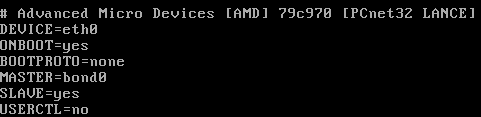
eth0 is a static interface configured in /etc/sysconfig/network/network-scripts/ifcfg-eth0:


eth1 is a static interface configured in /etc/sysconfig/network/network-scripts/ifcfg-eth1

The hardware is configured in /etc/modprobe.conf:


First we add a config file for bond0, /etc/sysconfig/network/network-scripts/ifcfg-bond0:


Now we edit /etc/sysconfig/network/network-scripts/ifcfg-eth0:


Now we edit /etc/sysconfig/network/network-scripts/ifcfg-eth1:

Network scripts are now complete in /etc/sysconfig/network/network-scripts:


Add the bonding driver to /etc/modprobe.conf:


Shut down the network with 'service network stop'
Insert the bonding driver with 'modprobe bonding -o bond0 miimon=100 mode=1'
Start the network with 'service network start':

Check the interfaces with 'ifconfig':


Check the routing is ok with 'route -n':


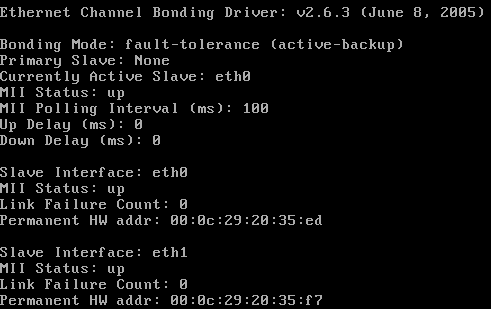
View the status with 'cat /proc/net/bonding/bond0':


Tuesday, 28 November 2006

IE7 Download Corruption

I have a particular file that I needed to download but IE7 consistantly corrupts it. It works fine with Firefox 2 and Free Download Manager. There is a strange dialog at the end of the download. This is a Print Screen capture:


It's not quite accurate because the progress bar is still there on the screen and there is a quarter of a (close?) button at the right hand end of the of where the progress bar would end.


I took a photo because I didn't seem able to Print Screen the dialog properly (bits were missing as above)

Friday, 24 November 2006

The Office Open XML file Building Blocks.dotx cannot be opened because there are problems with contents

I had a real problem with B2 Technical Refresh of Office 2007 not allowing me to insert page numbers, giving me the error message "The Office Open XML file Building Blocks.dotx cannot be opened because there are problems with contents."

Thanks to "PJ-DJ" I found the answer here:
http://forums.microsoft.com/TechNet/ShowPost.aspx?PostID=932036&SiteID=17

Step 1: Close Word and Outlook if you are using Word as your email editor.
Step 2: Go to C:\Documents and Settings\(Username)\Application Data\Microsoft\Document Building Blocks\1033 and delete the Building Blocks.dotx file.
Step 3: Open Word. CLOSE IT AGAIN. Wait a few seconds.
Step 4: Open Word. On a blank document, Insert Page Numbers. Check your C:\Documents and Settings\(Username)\Application Data\Microsoft\Document Building Blocks\1033 folder. A new Building Blocks.dotx file should have been created.
Step 5: There is no Step 5. You should be fine now.


I really must get that licensed copy of Office 2007 installed - But I'm not sure if Sharepoint designer is released?

Thursday, 23 November 2006

Gissa Job?

Things aren't going too well at work - The direction the company wants to take and the direction I want to take do not match!

Anyone need a technical type of guy?

I prefer to work around the Ipswich, Suffolk area and you can find a general purpose CV in PDF format here.

If you need it in another format, give me a shout.

Sunday, 12 November 2006

CS 2.1 SP 1 Fixed Comment Review Problem

I've just applied CS 2.1 SP1 and it fixed my comment review problem described earlier. [:D]

Saturday, 28 October 2006

CS2.1 Review Comments does not display correctly in IE7

I have to review comments before I allow them to be posted on the site because, as all blog owners know, you get a lot of spam comments. IE7 doesn't want to let me review them in lower resolutions. I get a cut off review line with no horizontal scroll bar. See what I mean here.

Firefox 2.0 fares better. It wraps the comment line and lets me scroll the windows horizontally if I have a long comment title. The colours are a little bit weird but I can live with that. See how Firefox 2.0 copes here.

I've posted a bug to the support forum so lets see how that does.

Sunday, 15 October 2006

Vista and Outlook 2007 - Turn off the reading pane

I really don't get on with the Outlook 2007 reading pane because it uses up to my screen real estate on my laptop. I knew that you can turn it off with the "/nopreview" switch at the command line but you can't edit the special icon to change the startup command line.

I did a bit of digging and found that by selecting the "Command Line" option from the Task Manager "View > Select Columns..." entry you could see the actual command lines used to start processes. I could see that Outlook was already starting with the "/recycle" switch to reuse Outlook instances so I set out to find this in the registry.

To start Outlook with the "/nopreview" switch I edited the following registry entry. (Insert standard disclaimer here!) The registry key was:
HKLM\SOFTWARE\Clients\Mail\Microsoft Outlook\shell\open\command
REG_SZ: "C:\PROGRA~1\MICROS~3\Office12\Outlook.exe" /recycle /nopreview

Sunday, 1 October 2006

Exchange Server 2007 Beta2 Maximum Mail Stores

I was trying to work out the limits of the current beta of Exchange 2007 in terms of storage groups and mailbox stores and through experimentation I discovered that they are:
  • Maximum Storage Groups: 50
  • Maximum Mail Stores per Storage Group: 5
I guess that's a grand total of 250 mailbox stores then. That's a massive improvement over Exchange 2003!

Grant full mailbox permissions in Exchange 2007 Beta2

Final step upon upgrading the test server to Exchange 2007 Beta2 was to give me full access to all the mailboxes. It's another Power Shell task and I managed to find the syntax at the Microsoft Exchange Team Blog.

Add-MailboxPermission mailbox -AccessRights FullAccess -user user

This gives user full access permisions to mailbox.

Exchange 2007 Beta2 - Allow hub connector to receive unauthenticated SMTP mail

You need to set the permissions to allow Anonymous users to submit mail. This is not in the GUI so you must use the Power Shell.

1. Set the permission:
set-receiveconnector 'Default CHEF' -PermissionGroups:"ExchangeUsers,ExchangeServers,ExchangeLegacyServers,AnonymousUsers"Replace CHEF with your Exchange server name!

2. Verify the permission:
get-receiveconnector | format-listSchema: Microsoft.Exchange.Data.Directory.SystemConfiguration.ReceiveConnectorSchema
AuthMechanism: Tls, BasicAuth, BasicAuthPlusTls, ExchangeServer
Banner:
BinaryMimeEnabled: True
Bindings: {0.0.0.0:25}
ChunkingEnabled: True
DefaultDomain:
DeliveryStatusNotificationEnabled: True
EightBitMimeEnabled: True
EnhancedStatusCodesEnabled: True
ExternallySecuredAsPartnerDomain:
Fqdn: mail.thefoleyhouse.co.uk
Comment:
Enabled: True
ConnectionTimeout: 00:10:00
ConnectionInactivityTimeout: 00:05:00
MessageRateLimit: unlimited
MaxInboundConnection: 5000
MaxInboundConnectionPerSource: unlimited
MaxInboundConnectionPercentagePerSource: 100
MaxHeaderSize: 64KB
MaxHopCount: 30
MaxLocalHopCount: 3
MaxLogonFailures: 3
MaxMessageSize: 10MB
MaxProtocolErrors: 5
MaxRecipientsPerMessage: 5000
PermissionGroups: AnonymousUsers, ExchangeUsers, ExchangeServers, ExchangeLegacyServers, CustomPipeliningEnabled: True
ProtocolLoggingLevel: None
RemoteIPRanges: {0.0.0.0-255.255.255.255}
RequireEHLODomain: False
RequireTLS: False
Server: CHEF
SizeEnabled: True
TarpitInterval: 00:00:05
AdminDisplayName:
ObjectCategoryName: msExchSmtpReceiveConnector
ExchangeVersion: 0.1 (8.0.535.0)
CurrentObjectVersion: 0.1 (8.0.535.0)
Name: Default CHEF
DistinguishedName: CN=Default CHEF,CN=SMTP Receive Connectors,CN=Protocols,CN=CHEF,CN=Servers,CN=Exchange Administrative Group (FYDIBOHF23SPDLT),CN=Administrative Groups,CN=The Foley House,CN=Microsoft Exchange,CN=Services,CN=Configuration,DC=thefoleyhouse,DC=ad
Identity: CHEF\Default CHEF
Guid: 0675a1d2-9c19-4068-af33-782d1c27f562
ObjectCategory: thefoleyhouse.ad/Configuration/Schema/ms-Exch-Smtp-Receive-Connector
ObjectClass: {top, msExchSmtpReceiveConnector}
OriginalId: CHEF\Default CHEF
WhenChanged: 01/10/2006 19:58:31
WhenCreated: 30/09/2006 00:19:26
ObjectState: Unchanged
OriginatingServer: chef.thefoleyhouse.ad
IsReadOnly: False
Id: CHEF\Default CHEF
IsValid: True

How to set recipent email addresses in Exchange 2007 Beta2

To set recipient email address policy, do the following:

1. In the Exchange Management Console, navigate to 'Organization Configuration' > 'Hub Transport' > 'Email Address Policies'. Here you will see the default policy and you can select 'Edit' on the left hand side of the MMC console.


2. We are editing the default policy so just click 'Next'.


3. Again, just select 'Next' because we are editing the default policy for all objects.


4. Now edit the default email address. Because mine is set as an alternate UPN I can click the SMTP address and click 'Edit'.


5. As the email address I want to use is an alternate UPN and can select it from the drop down box and select 'OK'.


6. Click 'Next' to apply changes immediately.


7. Click 'Edit' to make the changes.


8. This dialog shows the Power Shell script along with any warnings. I have an invalid recipient name from my old Exchange 2003 organisation that I must get round to changing! ;-)


9. All done and applied. I like how the 'True' display lets you know that you did apply the policy.

Creating an Internet send connector in Exchange 2007 Beta 2

Before you can send mail to the internet with a single server you have to make a connector for your mail transport hub role. The remote domain should already be configured to '*' for the Internet but create a send connector like so:

1. Open up the Exchange Management console and select Organization Configuration > Hub Transport and click 'New Send Connector...' underneath Actions, Hub Transport on the right hand side.


2. You should now get the 'New SMTP Send Connector' dialog box. Enter 'Internet' for the name and leave the intended use at 'Custom' for this connector.


3. Next, for the Domain enter '*' and ensure that you leave 'Include all subdomains' selected.


4. Next, choose if you are going to use a smarthost or MX records to deliver mail. Because a lot of administrator block dynamic IP addresses and this test server has a dynamic address I have elected to use my ISP mail server. They relay mail from my IP address and I have used the DNS name of the server to simplify the connection.


5. Next, if you need to authenticate to your smart host, put the details in here. I don't.


6. Next, select the server that will send mail over the connector. If you only have one server it should already be added.


7. Next, verify the settings.


8. Next, create the connector. Beta 2 lists the Power Shell command you could have used to create this connector from the command line.


9. All done.

Updating a single Exchange 2003 server to Exchange 2007 Beta 2

I've done this on my test server and there are a couple of problems you have to deal with:
  • The databases are not compatible. Exchange 2003 uses STM and EDB files with 5MB logs whereas Exchange 2007 uses just an EDB file with 1MB logs. There may also be a difference on how data is organsied internally. I have seen reports of 4KB vs 8KB database pages.
  • Exchange 2007 really needs an edge server role for secure deployment. If you're going to use a single server then you'll have to use the hub transport server to send and receive internet email. Allthought his works, it is not a reccommended scenario.
The steps I took to upgrade my Exchange server then were as follows.
  1. Backup everything.
  2. Backup everything again using a different method. :)
  3. Extract the mail from the old Exchange 2003 server using a tool such as ExMerge.
  4. Disable\Delete all old mailboxes from mail stores.
  5. Uninstall Exchange 2003.
  6. Install Exchange 2007 using the mailbox, client access and hub transport roles.
  7. Set recipient policy to ensure correct email addresses are allocated.
  8. Re-enable mailboxes.
  9. Test internal mail connectivity using owa.
  10. Import mail. As it was a small test organisation and I had removed the old server I used Outlook for each user to import thier own mail. If I had a new server then I could have installed it into the Exchange 2003 organisation and used the move mailbox wizard.
  11. Create an SMTP send connector.
  12. Allow unauthenticated SMTP connections on the incoming (default) SMTP connector.
  13. Setup any mailbox permissions you wish to have.
It now seems to be working. Watch out for more details on steps 7,11,12 and 13. Some of this can be done using the GUI, some using Power Shell.