Tuesday, 22 January 2008

Microsoft Windows Server 2008 Core - Demos

Thursday, 10 January 2008

How-To Create an Outlook Profile Automatically

We need a way of creating users Outlook profiles automatically. They can run this the first time they login, or at any other time to recreate thier profile.

First download the files here.

The files are stored in a shared directory.
We created a directory in SYSVOL so that all users could access them.
The path would be something like \\YourDomainName\SYSVOL\YourDomainName\Scripts\OutlookFirstRun.
They could be stored in a standard shared folder if you prefer, just edit the path in the scripts.

OutlookFirstRun.au3:
This is an AutoIT script that you need to edit and compile to an .EXE using Auto IT (Freeware).
It can be found at http://www.autoitscript.com/

Outlook.ico:
The outlook icon for compiling OutlookFirstRun.exe.
We used this so that the program looked the same as Outlook.

DisplayName.vbs:
This is a VB script that writes the users display name to a file.
We write it to F:\Display.txt, as F:\ is the users home directory.
Again, you can change this.

Outlook.prf:
This is a file that contains settings to be imported into outlook.
It sets up the users profile for them.

Functional description:
Instead of launching Outlook.exe, the user launches OutlookFirstRun.exe. You have to arrange for this to happen. We use Ericom to publish this as a terminal server application but you could create an MSI or use the RunOnce registry key. The program could be included in your build Ghost image for example.
OutlookFirstRun.exe calls DisplayName.VBS.
DisplayName.vbs reads the users display name from AD and creates as an Environment Variable %DISPLAYNAME%.
OutlookFirstRun then launches Outlook.exe and imports Outlook.prf.
Outlook.prf must be edited to contain your Exchange server name and any additional changes.
We don’t use cached PSTs for example, as we’re running in a terminal server farm environment.

Feel free to use these files - Distributed under GPL-v3.

Tuesday, 8 January 2008

Event ID 1058 and 1030

On several AD installations with multiple domain controllers I have seen servers continuosly logging event 1058 and 1030.

Running "dfsutil /PurgeMupCache" followed by "gpupdate /Force" always seems to fix it.

You obtain DFSUTIL from the support tools (SUPTOOLS.MSI) from the server installation CD located in \Support\Tools I think

Monday, 10 December 2007

How to enable hibernate in Windows Vista

Apparently, Windows Vista prefers to use a bastardisation of standby and hibernate as a default, storing memory contents to disk as well as low powered state in RAM.

It doesn't help much if you want to power down your machine to transport it to another location though!

To re-enable hibernate use the following command as an administrator:
    powercfg -h on

See this KB article for more information.

Sunday, 9 December 2007

Moving Windows Sharepoint Services Databases in SQL 2005

I was migrating an old WSS 2.0 site on SQL 2000, to WSS 3.0 on SQL 2005, and didn't like where the default databases were being created.

I detached the databases, moved them to thier new location, and re-attached them.
This changed the owner from "NT Authority\Network Service" to my account.

I used the following SQL code to change the owner back:
  USE whichever_database
  EXEC sp_changedbowner 'NT Authority\Network Service'

Thanks to Kalen Delaney for that!

Sunday, 18 November 2007

Printing to Canon MP530 from Eee PC 701

I bought a lttle Eee PC 701 machine but had problems configuring it to print to my Canon MP530.

I decided to try the Turboprint.de driver and had some success.

Download the Turboprint debian package from http://www.turboprint.info/

Start a terminal by pressing "Ctrl+Alt+T"

Become root by typing "su -" and entering your user password

Add the following to /etc/apt/sources/list
deb http://xnv4.xandros.com/4.0/pkg xandros4.0-xn main contrib nonfree

Update the apt sources by typing "apt-get update"

Install the required libraries by typing "apt-get install libgtk1.2-common libgtk1.2 libglib1.2"

Install Turboprint by changing to the directory you downloaded it to (such as "cd /home/user") and the using the dpg command to install "dpg -i turboprint_1.96-3_i386.deb".

I then commented out the Xandros4 source from /etc/apt/sources.list and ran the "apt-get update" command again.

Now add the printer using the "Canon Turboprint" drivers. I added mine from my shared windows PC with no problem.

Sunday, 21 October 2007

Ubuntu on Dell Inspiron 5100 Problems solved

I've managed to improve my video by switching from the Vesa driver (enabled by default) to the Radeon driver.
The Radeon driver would not work properly without adding the line Option '"LVDSBiosNativeMode" "FALSE"' to /etc/X11/xorg.conf. Thanks to Ricky Cambell for that.

I also found some useful help regarding boot up speed and temperature control from this thread at the Ubuntu forum. 

Ubuntu 7.10 on Dell Inspiron 5100

Well - I've been running Vista on my new laptop for sometime so decided to play with the new Ubuntu release on my old Dell Inspiron 5100. It was a very easy install!

I had to start from the CD in safe graphics mode but when the install was complete, Ubuntu offered to install the softmodem and wireless card automatically.

I pointed the wireless installer at the driver reccomended by the Ubuntu Wifi docs site and everything worked first time.

Nice! All I need to do now is find a way to improve how the fonts look in Firefox. 

Saturday, 15 September 2007

Problems with Nero 7 in Windows Vista Ultimate x64

I have had a number of issues in getting my favourite burning program, Nero 7, working in Windows Vista Ultimate x64. These are:


1. Every time I login I receive a message "Nero Home Has Stopped Responding". When I click to end this process, it obviously starts again because the message keeps repeating forever.
I have opened a support call with Nero about this but no progress so far. My work round is to kill the processes "WerFault.exe *32" and "NMBgMonitor.exe" in Task Manager. I have further used MSConfig to disable Nero Home on the Startup tab.


2. In Media Centre, selecting the Nero plug-in causes an "Invalid Application Error".
I have also passed this to Nero, but again no response as yet. I am using MCEBuddy to automatically convert Media Centre recordings to WMV files and then burning using standard DVD creation programs. This saves me disk space and gives me more control anyway so I am not that bothered.


3. When trying to burn a DVD or CD with Nero Burning ROM, I get a message saying "The Server is Busy. This action cannot be completed.....".
I believe that this is related to problem 1 above. I killed all the NM* processes in task manager and Nero was able to open the burning dialog OK. The processes did keep restarting, so I have used Computer Management to disable the NMIndexingService service. I may have to kill these NM* processes manually again next time but at least I can get Nero to work.


At the moment, I have the latest version of Nero 7 available from the Nero website: 7.10.1.0


Update: Ahead came up with a patched DLL but this has not fixed the problem for me.


Update 2: Just had an email from Ahead to confirm that this is a known and fixed issue that is fixed in the next release. Unfortunately, they could not give me the date for the next release. :(

Wednesday, 12 September 2007

Extracting WMV from MCE

I initially tried playing with DVRMSToolbox, but it had some significant issues wwth Vista 64. (Would not convert to WMV and Commercial skipping not working in Media Centre).

I found another tool called MCE Buddy. This is not as flexible as DVRMSToolbox but it just works!

You can find it here:
http://www.mcebuddy.com/

How to Enable Versbose Startup\Shutodown\Logon\Logoff Messages in Windows XP

Create HKLM\Software\Microsoft\Windows\CurrentVersion\Policies\System\verbosestatus
It needs to be Dword with a value of 0x1.

Tuesday, 11 September 2007

BBC iPlayer on Windows Vista

I had worked out sometime ago how to install Sky Anytime onto my Laptop (useful for those stays away), but I wanted to install the BBC iPlayer back onto my desktop after an upgrade to Windows Vista (I have no need for 4OD as it is delivered through my Virgin Media cable).

It turns out that all you have to do is to change the user agent (UA) strings to fool the BBC website into letting you download the iPlayer.

I found details on how to do it here:
http://community.plus.net/comms/2007/08/02/how-to-install-the-bbc-iplayer-on-windows-vista/

You can download the UA registry changes from here:
http://www.fiddlertool.com/useragent.aspx


Update:
You can only play the DRM files if you have administrative rights.


Update2:
I've found the download from Microsoft called "User Agent String Utility" to be a better long-term choice. This allows you to open a copy of IE7 configured to react like IE6. You can then use this to access the BBC iPlayer site. Get it here.

Update to CS 2.1 SP3

Please let me know of any problems.

I am actually a couple of versions behind because CS 2007 SP2 is out.

Synchronise Media from Media Centre to External Storage on XDA Orbit

Since installing Windows Vista Ultimate and a TV card on my desktop PC, I have been playing with Media Centre. Everything was working great except synchronising content to my Windows Mobile 5.0 device (an O2 XDA Orbit).

I was only being offered the change to synchronise to the internal storage of the device. The XDA Orbit has just 64MB of internal storage, of which I only have 14MB free. You can't fit much on there!

It turns out that this is a bug with Media Centre not resolving device names correctly. The fix isn't currently delivered by Windows\Microsoft update, but once I had identified and installed it, everything worked fine.

I've not yet worked out how to synch individual programs from MCE so I still have issues with running out of storage on my 1GB card. I've seen reports that 2GB is the max I can use although some claim 4GB - I see a trip to ebay in my future! I also feel I get more control with Nero recode so I guess it would be great if you could extract WMV files from MCE, anyone know how?

I found the bug described here:
http://www.tabletquestions.com/windows-vista/9396-windows-mobile-device-center-media-center-pocket-pc-sync.html

I found the KB931621 fix here:
http://support.microsoft.com/kb/931621/en-us


Update:
Nero can process the dvr-ms files directly (at least with the Vista codec pack I have installed). You find them in C:\Users\Publix\Recorded TV.

Thursday, 19 July 2007

Greylisting on Exchange 2003

A massive increase in Spam, particularly PDF attached stock scams, has happened here recently.

I decided to look for something different and found this free Greylisting product for Exchange 2000\2003.

Wednesday, 18 July 2007

VMWare Server v1.0.3 unable to bridge to wireless network on Vista

I've been trying to test some printing configurations on SLES 10 SP1 but I couldn't get my laptop running Windows Vista Ultimate and VMWare Server v1.0.3 to successfully bridge onto the wireless adaptor.

I could use NAT but then it was difficult to test connectivity to the server.

Having hunted around a bit I found this useful post: Abstract path:VMWare, Wireless Network Adapter and Bridging

This pointed to a VMWare article which allows the Vista adaptor bridging feature to be enabled between the onboard wireless card and the virtual adaptor created by VMware.

Before this fix I could only contact the host wireless IP address, now I can connect to everything but! If anyone knows how to get the VMWare native bridging feature to work, please get in touch.

N.B. The only step missing from the above articles was that you must create a VMware virtual adaptor (I used adapator #2) and delete the DHCP scope for it. Fail to do the and you will leak DHCP onto your wireless network!

SkyAnywhere on Vista?

SkyAnywhere has been running well on my laptop for sometime. I had to flag it to run as an administrator but everything worked.

Today it insisted on downloading an update when I fancied watching a film, but then refused to run it because my machine wasn't running XP.

After a search I found this thread which allowed me to run it again!

Friday, 6 April 2007

How to Display SCL (Spam Confidence Level) in Outlook 2007

Firstly, download and install this Exchange Event Sink as described here:
http://www.ivasoft.biz/showscl.shtml

Secondly, create a custom formula field to display the SCL as described here:
http://forums.microsoft.com/TechNet/ShowPost.aspx?PostID=739718&SiteID=17

The use of Right([Comments],5,2) allows an SCL of -1 through 9 to display correctly.

Of course, if you are using Outlook 2007 with Exchange 2007 you can see the Spam score by looking at the Internet headers - I have not seen a method to display this on the Outlook email list page yet.
http://technet.microsoft.com/en-us/library/bb124595.aspx

Tuesday, 3 April 2007

Downgrade Exchange 2007 B2 to Exchange 2003 SP2

Oh, what fun and games I had.

First I backed up all the mail:
  • Outlook export to PST
  • ExMerge (Hey - It worked on Exchange 2007!)
  • NT Backup of store
Then I removed Exchange 2007 and reininstalled Exchange 2003 - Except it didn't quite go that smooth,

The installation errored saying that it could not install the information store and to check the install log. I found this error message:
mode = 'Install' (61953) CBaseAtom::ScSetup (f:\titanium\admin\src\udog\setupbase\basecomp\baseatom.cxx:842)
Error code 0XC00736B1 (14001): This application has failed to start because the application configuration is incorrect. Reinstalling the application may fix this problem.


Tracing back up the install log found this message:
Interpreting line -- ID:31259 --
CInsParser::ScProcessLine (f:\titanium\admin\src\libs\exsetup\hiddenw1.cxx:1225)
Error code 0XC00736B1 (14001): This application has failed to start because the application configuration is incorrect. Reinstalling the application may fix this problem.


Tracing back futher led to this line:
Copying c:\program files\common files\microsoft shared\cdo\cdoex.dll
Preserving existing copy of c:\program files\common files\microsoft shared\cdo\cdoex.dll

Sure enough, typing "regsvr32 c:\program files\common files\microsoft shared\cdo\cdoex.dll" produced the same error code.

I deleted the copy of cdoex.dll and replaced it with the copy from the Exchange Server 2003 CD and re-ran the regsvr32 command - It worked. I clicked "Retry" and the install completed.

I did receive an error message about the wrong version of mapi32.dll being on the hard disk so I also replaced from the CD too.

Applied Exchange 2003 SP2 and visited Microsoft update to apply some hot fixes and everything appears to be working well.

Blog Outage

Sorry for the outage - I needed to remove Exchange Server 2007 B2 from my test server and return to Exchange 2003 SP2.  This did not go smoothly and I had to do a lot of troubleshooting.
Part of this troubleshooting involved removing IIS (and all the wen sites with it) which brole ASP.NET 2.0 and everthing that relied on it.
Everything is installed and working again (except my ISP connection is down).
Everything should be back to normal.

Thursday, 4 January 2007

Update to CS 2.1 SP2

Updated to CS 2.1 SP2 today. Please let me know of any problems.

Friday, 1 December 2006

ebay Broken?

Good start to the day, I need to buy some stuff for Christmas and ebay seems broken for me:

That's happening for every item so I wonder how much money they are losing?
Managed to see the item a few seconds later, bought it, but got this:

Wednesday, 29 November 2006

Linux NIC Bonding

I had a query on how to setup NIC bonding in RHEL4 so thought I would document it for the blog.

I'll start with a standard server with 2 NICs, eth0 and eth1. Here is the output from 'ifconfig':


The configuration scripts are found in /etc/sysconfig/network/network/scripts:


eth0 is a static interface configured in /etc/sysconfig/network/network-scripts/ifcfg-eth0:


eth1 is a static interface configured in /etc/sysconfig/network/network-scripts/ifcfg-eth1

The hardware is configured in /etc/modprobe.conf:


First we add a config file for bond0, /etc/sysconfig/network/network-scripts/ifcfg-bond0:


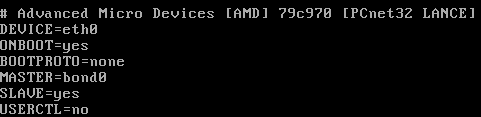
Now we edit /etc/sysconfig/network/network-scripts/ifcfg-eth0:


Now we edit /etc/sysconfig/network/network-scripts/ifcfg-eth1:

Network scripts are now complete in /etc/sysconfig/network/network-scripts:


Add the bonding driver to /etc/modprobe.conf:


Shut down the network with 'service network stop'
Insert the bonding driver with 'modprobe bonding -o bond0 miimon=100 mode=1'
Start the network with 'service network start':

Check the interfaces with 'ifconfig':


Check the routing is ok with 'route -n':


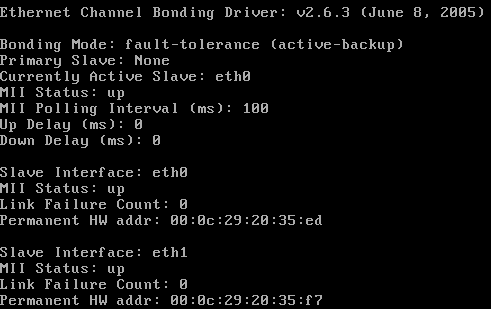
View the status with 'cat /proc/net/bonding/bond0':


Tuesday, 28 November 2006

IE7 Download Corruption

I have a particular file that I needed to download but IE7 consistantly corrupts it. It works fine with Firefox 2 and Free Download Manager. There is a strange dialog at the end of the download. This is a Print Screen capture:


It's not quite accurate because the progress bar is still there on the screen and there is a quarter of a (close?) button at the right hand end of the of where the progress bar would end.


I took a photo because I didn't seem able to Print Screen the dialog properly (bits were missing as above)

Friday, 24 November 2006

The Office Open XML file Building Blocks.dotx cannot be opened because there are problems with contents

I had a real problem with B2 Technical Refresh of Office 2007 not allowing me to insert page numbers, giving me the error message "The Office Open XML file Building Blocks.dotx cannot be opened because there are problems with contents."

Thanks to "PJ-DJ" I found the answer here:
http://forums.microsoft.com/TechNet/ShowPost.aspx?PostID=932036&SiteID=17

Step 1: Close Word and Outlook if you are using Word as your email editor.
Step 2: Go to C:\Documents and Settings\(Username)\Application Data\Microsoft\Document Building Blocks\1033 and delete the Building Blocks.dotx file.
Step 3: Open Word. CLOSE IT AGAIN. Wait a few seconds.
Step 4: Open Word. On a blank document, Insert Page Numbers. Check your C:\Documents and Settings\(Username)\Application Data\Microsoft\Document Building Blocks\1033 folder. A new Building Blocks.dotx file should have been created.
Step 5: There is no Step 5. You should be fine now.


I really must get that licensed copy of Office 2007 installed - But I'm not sure if Sharepoint designer is released?

Thursday, 23 November 2006

Gissa Job?

Things aren't going too well at work - The direction the company wants to take and the direction I want to take do not match!

Anyone need a technical type of guy?

I prefer to work around the Ipswich, Suffolk area and you can find a general purpose CV in PDF format here.

If you need it in another format, give me a shout.

Sunday, 12 November 2006

CS 2.1 SP 1 Fixed Comment Review Problem

I've just applied CS 2.1 SP1 and it fixed my comment review problem described earlier. [:D]

Saturday, 28 October 2006

CS2.1 Review Comments does not display correctly in IE7

I have to review comments before I allow them to be posted on the site because, as all blog owners know, you get a lot of spam comments. IE7 doesn't want to let me review them in lower resolutions. I get a cut off review line with no horizontal scroll bar. See what I mean here.

Firefox 2.0 fares better. It wraps the comment line and lets me scroll the windows horizontally if I have a long comment title. The colours are a little bit weird but I can live with that. See how Firefox 2.0 copes here.

I've posted a bug to the support forum so lets see how that does.

Sunday, 15 October 2006

Vista and Outlook 2007 - Turn off the reading pane

I really don't get on with the Outlook 2007 reading pane because it uses up to my screen real estate on my laptop. I knew that you can turn it off with the "/nopreview" switch at the command line but you can't edit the special icon to change the startup command line.

I did a bit of digging and found that by selecting the "Command Line" option from the Task Manager "View > Select Columns..." entry you could see the actual command lines used to start processes. I could see that Outlook was already starting with the "/recycle" switch to reuse Outlook instances so I set out to find this in the registry.

To start Outlook with the "/nopreview" switch I edited the following registry entry. (Insert standard disclaimer here!) The registry key was:
HKLM\SOFTWARE\Clients\Mail\Microsoft Outlook\shell\open\command
REG_SZ: "C:\PROGRA~1\MICROS~3\Office12\Outlook.exe" /recycle /nopreview

Sunday, 1 October 2006

Exchange Server 2007 Beta2 Maximum Mail Stores

I was trying to work out the limits of the current beta of Exchange 2007 in terms of storage groups and mailbox stores and through experimentation I discovered that they are:
  • Maximum Storage Groups: 50
  • Maximum Mail Stores per Storage Group: 5
I guess that's a grand total of 250 mailbox stores then. That's a massive improvement over Exchange 2003!

Grant full mailbox permissions in Exchange 2007 Beta2

Final step upon upgrading the test server to Exchange 2007 Beta2 was to give me full access to all the mailboxes. It's another Power Shell task and I managed to find the syntax at the Microsoft Exchange Team Blog.

Add-MailboxPermission mailbox -AccessRights FullAccess -user user

This gives user full access permisions to mailbox.

Exchange 2007 Beta2 - Allow hub connector to receive unauthenticated SMTP mail

You need to set the permissions to allow Anonymous users to submit mail. This is not in the GUI so you must use the Power Shell.

1. Set the permission:
set-receiveconnector 'Default CHEF' -PermissionGroups:"ExchangeUsers,ExchangeServers,ExchangeLegacyServers,AnonymousUsers"Replace CHEF with your Exchange server name!

2. Verify the permission:
get-receiveconnector | format-listSchema: Microsoft.Exchange.Data.Directory.SystemConfiguration.ReceiveConnectorSchema
AuthMechanism: Tls, BasicAuth, BasicAuthPlusTls, ExchangeServer
Banner:
BinaryMimeEnabled: True
Bindings: {0.0.0.0:25}
ChunkingEnabled: True
DefaultDomain:
DeliveryStatusNotificationEnabled: True
EightBitMimeEnabled: True
EnhancedStatusCodesEnabled: True
ExternallySecuredAsPartnerDomain:
Fqdn: mail.thefoleyhouse.co.uk
Comment:
Enabled: True
ConnectionTimeout: 00:10:00
ConnectionInactivityTimeout: 00:05:00
MessageRateLimit: unlimited
MaxInboundConnection: 5000
MaxInboundConnectionPerSource: unlimited
MaxInboundConnectionPercentagePerSource: 100
MaxHeaderSize: 64KB
MaxHopCount: 30
MaxLocalHopCount: 3
MaxLogonFailures: 3
MaxMessageSize: 10MB
MaxProtocolErrors: 5
MaxRecipientsPerMessage: 5000
PermissionGroups: AnonymousUsers, ExchangeUsers, ExchangeServers, ExchangeLegacyServers, CustomPipeliningEnabled: True
ProtocolLoggingLevel: None
RemoteIPRanges: {0.0.0.0-255.255.255.255}
RequireEHLODomain: False
RequireTLS: False
Server: CHEF
SizeEnabled: True
TarpitInterval: 00:00:05
AdminDisplayName:
ObjectCategoryName: msExchSmtpReceiveConnector
ExchangeVersion: 0.1 (8.0.535.0)
CurrentObjectVersion: 0.1 (8.0.535.0)
Name: Default CHEF
DistinguishedName: CN=Default CHEF,CN=SMTP Receive Connectors,CN=Protocols,CN=CHEF,CN=Servers,CN=Exchange Administrative Group (FYDIBOHF23SPDLT),CN=Administrative Groups,CN=The Foley House,CN=Microsoft Exchange,CN=Services,CN=Configuration,DC=thefoleyhouse,DC=ad
Identity: CHEF\Default CHEF
Guid: 0675a1d2-9c19-4068-af33-782d1c27f562
ObjectCategory: thefoleyhouse.ad/Configuration/Schema/ms-Exch-Smtp-Receive-Connector
ObjectClass: {top, msExchSmtpReceiveConnector}
OriginalId: CHEF\Default CHEF
WhenChanged: 01/10/2006 19:58:31
WhenCreated: 30/09/2006 00:19:26
ObjectState: Unchanged
OriginatingServer: chef.thefoleyhouse.ad
IsReadOnly: False
Id: CHEF\Default CHEF
IsValid: True

How to set recipent email addresses in Exchange 2007 Beta2

To set recipient email address policy, do the following:

1. In the Exchange Management Console, navigate to 'Organization Configuration' > 'Hub Transport' > 'Email Address Policies'. Here you will see the default policy and you can select 'Edit' on the left hand side of the MMC console.


2. We are editing the default policy so just click 'Next'.


3. Again, just select 'Next' because we are editing the default policy for all objects.


4. Now edit the default email address. Because mine is set as an alternate UPN I can click the SMTP address and click 'Edit'.


5. As the email address I want to use is an alternate UPN and can select it from the drop down box and select 'OK'.


6. Click 'Next' to apply changes immediately.


7. Click 'Edit' to make the changes.


8. This dialog shows the Power Shell script along with any warnings. I have an invalid recipient name from my old Exchange 2003 organisation that I must get round to changing! ;-)


9. All done and applied. I like how the 'True' display lets you know that you did apply the policy.

Creating an Internet send connector in Exchange 2007 Beta 2

Before you can send mail to the internet with a single server you have to make a connector for your mail transport hub role. The remote domain should already be configured to '*' for the Internet but create a send connector like so:

1. Open up the Exchange Management console and select Organization Configuration > Hub Transport and click 'New Send Connector...' underneath Actions, Hub Transport on the right hand side.


2. You should now get the 'New SMTP Send Connector' dialog box. Enter 'Internet' for the name and leave the intended use at 'Custom' for this connector.


3. Next, for the Domain enter '*' and ensure that you leave 'Include all subdomains' selected.


4. Next, choose if you are going to use a smarthost or MX records to deliver mail. Because a lot of administrator block dynamic IP addresses and this test server has a dynamic address I have elected to use my ISP mail server. They relay mail from my IP address and I have used the DNS name of the server to simplify the connection.


5. Next, if you need to authenticate to your smart host, put the details in here. I don't.


6. Next, select the server that will send mail over the connector. If you only have one server it should already be added.


7. Next, verify the settings.


8. Next, create the connector. Beta 2 lists the Power Shell command you could have used to create this connector from the command line.


9. All done.

Updating a single Exchange 2003 server to Exchange 2007 Beta 2

I've done this on my test server and there are a couple of problems you have to deal with:
  • The databases are not compatible. Exchange 2003 uses STM and EDB files with 5MB logs whereas Exchange 2007 uses just an EDB file with 1MB logs. There may also be a difference on how data is organsied internally. I have seen reports of 4KB vs 8KB database pages.
  • Exchange 2007 really needs an edge server role for secure deployment. If you're going to use a single server then you'll have to use the hub transport server to send and receive internet email. Allthought his works, it is not a reccommended scenario.
The steps I took to upgrade my Exchange server then were as follows.
  1. Backup everything.
  2. Backup everything again using a different method. :)
  3. Extract the mail from the old Exchange 2003 server using a tool such as ExMerge.
  4. Disable\Delete all old mailboxes from mail stores.
  5. Uninstall Exchange 2003.
  6. Install Exchange 2007 using the mailbox, client access and hub transport roles.
  7. Set recipient policy to ensure correct email addresses are allocated.
  8. Re-enable mailboxes.
  9. Test internal mail connectivity using owa.
  10. Import mail. As it was a small test organisation and I had removed the old server I used Outlook for each user to import thier own mail. If I had a new server then I could have installed it into the Exchange 2003 organisation and used the move mailbox wizard.
  11. Create an SMTP send connector.
  12. Allow unauthenticated SMTP connections on the incoming (default) SMTP connector.
  13. Setup any mailbox permissions you wish to have.
It now seems to be working. Watch out for more details on steps 7,11,12 and 13. Some of this can be done using the GUI, some using Power Shell.

Friday, 29 September 2006

Exchange 2003 will not uninstall with error 0x8000ffff

Ok, I have a development server that runs Exchange 2003 as a testbed but I wanted to try Exchange 2007b2 on this box. I thought about reinstalling the box but feeling slightly lazy I decided to remove Exchange 2003 and install Exchange 2007b2. Except I couldn't.....

"Unexpected error 0x8000ffff" so the dialog box said. On examining the log file in the root of C:, the first mention of error 0x8000ffff was in relation to not being able to find the CD. Except it hadn't asked me for the CD.....

On further examination it turned out (I remember now) that I had mounted the Exchange 2003 install CD iso image using Daemon tools and shared them across the network. The error 0x8000ffff was because it couldn't find the share. I shared the iso from the same machine and same sharename and presto! It worked!

How to control OWA spell checker in Exchange 2003

Microsoft KB article 825430 details registry changes for controlling OWA. I came across it when looking for a solution to the error message "The spelling in this item can't be checked. Please try again later."

I think this problem is caused by organisational proxy servers (seen with both ISA and Border Manager) so there's not a lot you can do about someone elses proxy. Microsoft KB article 820378 has more details.

Thursday, 28 September 2006

SuSE 10.1 "eth0 renamed to eth1"

After playing with the bcm43xx wireless module I noticed my eth0 had been renamed to eth1, indeed the message also appeared in dmesg output:

dmesg | grep eth1
eth0 renamed to eth1

After a bit of poking I found duplicates of my network card mac address in the following file:

cat /etc/udev/rules.d/30-net_persistent_names.rules
SUBSYSTEM=="net", ACTION=="add", SYSFS{address}=="00:0d:56:37:58:8c", IMPORT="/lib/udev/rename_netiface %k eth0"
SUBSYSTEM=="net", ACTION=="add", SYSFS{address}=="00:90:4b:12:5f:fa", IMPORT="/lib/udev/rename_netiface %k wlan0"
SUBSYSTEM=="net", ACTION=="add", SYSFS{address}=="00:0d:56:37:58:8c", IMPORT="/lib/udev/rename_netiface %k eth1"
SUBSYSTEM=="net", ACTION=="add", SYSFS{address}=="00:0d:56:37:58:8c", IMPORT="/lib/udev/rename_netiface %k eth2"
SUBSYSTEM=="net", ACTION=="add", SYSFS{address}=="00:0d:56:37:58:8c", IMPORT="/lib/udev/rename_netiface %k eth3"
SUBSYSTEM=="net", ACTION=="add", SYSFS{address}=="00:0d:56:37:58:8c", IMPORT="/lib/udev/rename_netiface %k eth4"

Removing the extra lines (eth1-eth4) and restarting the network caused eth0 to behave again.

Monday, 25 September 2006

How to enable remote desktop.... Remotely!

I recently removed terminal services from my test server as I was through with it and the evaluation license was about to run out. When I tried to connect to my headless server using remote desktop I found that it was disabled by the removal of ts.

Thanks to a blog by cogent free knowledge I was able to enable remote desktop remotely.

Using regedt32, connect to the remote machines registry and change the following key from 1 (disabled) to 0 (enabled):
KEY: HKEY_LOCAL_MACHINE\SYSTEM\CurrentControlSet\Control\TerminalServer
DATA: fDenyTSConnections

No need to reboot, it works straight away.

Thursday, 21 September 2006

Using the bcm43xx driver with SuSE 10.1 and Dell Inspiron 5100

As of Kernel 2.6.17rc a native, reverse engineered, driver is available for bcm43xx range of wireless cards. I have had my bcm4306 rev 02 (Dell Truemobile 1300) card working in my Inspiron 5100 using ndiswrapper for some time but wanted to get the native driver working to play with tools such as kismet.

You'll need the following files:

Kernel.
Novell have not provided a kernel later than 2.6.16 so I had to find a more up to date one. I eventually settled on the 2.6.18rc7 one from the factory distributioncalled kernel-default-2.6.18_rc7_git1-2.i586.rpm. I can't store a copy here because community server does not seem to handle files that big.

Wireless tools.
The wireless tools provided with SuSE 10.1 do not seem to configure the new wireless driver correctly to I again used the rpm from the factory distribution.

bcm43xx-fwcutter-004.
This tool is required to extract firware from the windows driver to make the card work with Linux. You can find the file from the makers siteor use this local copy. I have a precompiled version here too.
A windows driver.
I had been using thedell driver with ndiswrapper with no problems but it would not work with bcm43xx giving me IRQ errors. I eventually found this onewhich worked great for me.

Proceedure.
1. Install the new kernel using a command similar to 'rpm -ivh kernel-default-2.6.18_rc7_git1-2.i586.rpm'. Reboot into the new kernel but be aware that if you were using ndiswrapper it will no longer work because the new kernel will prefer to use bcm43xx instead.

2. Install the new wireless tools. Because Yast2 and a few other pieces of software require the previous version of wireless tools you will get a dependency error on libiw.so.28. I used the following commands to get around this:
'rpm -Uvh –nodeps wireless-tools-29pre10-5.i586.rpm'
'ln -s /usr/lib/libiw.so /usr/lib/libiw.so.28'

3. Install the fwcutter tool from source or by copying the precomiled binary. Installing from source is the standard:
'./configure'
'make'
'make install'

4. Extract the firmware from the wl_apsta.o file using a command similar to:
'bcm43xx-fwcutter -w /lib/firmware wl_apsta.a'
This should place a load of bcm43xx* files into /lib/firmware.
5. Use Yast2 to configure your wireless card and reboot.
You should see output similar to the followig:

ifconfig wlan0
wlan0 Link encap:Ethernet HWaddr 00:90:4B:12:5F:FA
inet addr:192.168.0.51 Bcast:192.168.0.255 Mask:255.255.255.0
inet6 addr: fe80::290:4bff:fe12:5ffa/64 Scope:Link
UP BROADCAST RUNNING MULTICAST MTU:1500 Metric:1
RX packets:30401 errors:0 dropped:220 overruns:0 frame:0
TX packets:61069 errors:0 dropped:0 overruns:0 carrier:0
collisions:0 txqueuelen:1000
RX bytes:3078309 (2.9 Mb) TX bytes:87433000 (83.3 Mb)
Interrupt:11 Base address:0xc000

iwconfig wlan0
wlan0 IEEE 802.11b/g ESSID:"thefoleyhouse" Nickname:"Broadcom 4306"
Mode:Managed Frequency=2.412 GHz Access Point: 00:15:E9:E1:C9:15
Bit Rate=11 Mb/s Tx-Power=15 dBm
RTS thr:off Fragment thr:off
Encryption key:XXXX-XXXX-XX Security mode:open
Link Quality=100/100 Signal level=2/3 Noise level=187/100
Rx invalid nwid:0 Rx invalid crypt:0 Rx invalid frag:0
Tx excessive retries:0 Invalid misc:0 Missed beacon:0

lsmod |grep bcm43xx
bcm43xx 427776 0
firmware_class 14208 2 pcmcia,bcm43xx
ieee80211softmac 36992 1 bcm43xx
ieee80211 34760 2 bcm43xx,ieee80211softmac

Test Blog From Word 2007B2TR

Just thought I'd test "Publish to blog" from Word 2007B2TR. We'll see if it works!
And what about pictures?

Windows Genuine Advantage - Internet Connection Problem [0x80080293]

It's all well and good having Windows Genuine Advantage so that only licensed users can download products and fixes but surely the servers should be highly available or it defeats the purpose? I have a problem with Windows Defender not carrying out scheduled scans and I deceided to reinstall it as a troubleshooting step. Despite having validated my copy of Windows XP many times in the past (repeatedly!) I can not currently download Windows Defender:

Wednesday, 20 September 2006

Disgusting Keyboard

When my keyboard has got really bad in the past I just bought a new one. Today I decided to clean it:


After I took all the keys off:


After I cleaned it:


All back together again:

Blog Updated to CS2.1

I did a couple of trial runs on this and found the best option was to do a complete in place upgrade.
I first upgraded the database:
  • CS1.1>CS2.0
  • CD2.0>CS2.1
  • ASP1.1>ASP2.0
Then just extracted the new website over the old one. I initially tried creating a new website but had lots of prolems with the old photos!

Friday, 8 September 2006

Windows Live Messenger Setup Problem

I was told that a new version of Windows Live Messenger (v8.0.0812.0) was available so I downloaded it.
Problem is that I had to cancel setup for setup to continue because the "Windows Live Messenger Setup Wizard" tells me it can't run whilst the "Windows Live Messenger Setup Wizard" is running. There was only one copy running, honest!
[*-)]


Tuesday, 29 August 2006

Device Manager Empty

This has happened to me a number of times now. All of a sudden, plug and play hardware stops working and when you go into the device manager it all appears blank. Microsoft KB311504 suggests that this is caused by the Plug and Play service being stopped but this was not my problem.

My problem was that the HKLM\System\CurrentControlSet\Enum registry key was lacking permissions. Use REGEDT32 (Windows 2000) or REGEDIT (Windows XP) to add the System account with full control and Everyone with read to make this work again.

Saturday, 12 August 2006

AV Filtering mail with Evolution

This site has a nice script to run each incoming mail through ClamAV and to display a warning and move it to a quarentine folder if it contains a virus.
Thanks to Fred Blaise.

Saturday, 1 July 2006

XGL on Dell Inspiron 5100 with SUSE 10.1

This documents my attempt to install XGL on my Dell Inspiron 5100 laptop using Suse 10.1. I first tested it with the Kororaa Xgl Live CD so I knew that it would work. I had some problems with the login screen (seen this reported elsewhere - but I don't have it with SUSE 10.1) but overall it worked well. The following procedure works for me!
First a bit on hardware:
  • Dell Inspiron 5100
  • Radeon 7500 Mobility with 32 MB Video RAM
  • Using Xorg "radeon" driver with 3d dri enabled
I mainly followed the procedure on Opensuse.org here.

Download the following RPMs from Suse factory i586:
Download the following RPM from Suse factory noarch:
Install the RPMs. I had a dependency issue when I tried this:
  • error: Failed dependencies: libpng12.so.0(PNG12_0) is needed by compiz-cvs_060621-2.i586
  • I used --nodeps and it installed with no apparent side ill effects. There is a libpng12.so.0 in /usr/lib provided from libpng-1.2.8-17 so I am not sure why I got the error.
Make sure that you have enabled 3d acceleration from YaST:
(Image lost due to Blog move)

Activate the desktop effects from the Gnome Control centre:
(Image lost due to Blog move)

It didn't work for me first time because it said 3D acceleration enabled although it was. I saw this:
(Image lost due to Blog move)

When I checked the status with glxinfo I got this so I know it's working:
  • name of display: :0.0
  • display: :0 screen: 0
  • direct rendering: Yes

After a bit of research I found the XGL control applet sometimes does not identify that 3d acceleration is enabled and that if you hold shift and double click on “3D Acceleration: Disabled” then you can force it to on:
(Image lost due to Blog move)

You can now click on “Enable Desktop Effects” and you now have XGL!
The only problems I have are:
  • I occasionally get lines or corrupted pixels on screen. A quick spin of the cube (CTRL+ALT+ARROW) sorts these out quickly.
  • Windows have pink lines around them after restoring from hibernation. I have to restart the X server to sort these out.
  • The display does not handle full screen dvd video very well. Either use a hardware player (!) or turn of desktop effects to be able to play video at any decent speed.

Saturday, 24 June 2006

VMware on Suse 10.1

I've tried using CrossOffice to run MS Office applications on Linux but you really can't beat VMWare with an XP guest machine to run Outlook. That is unless you can't get VMWare to run. Thanks to Nilesh Bansal, now I can. 

SUSE 10.1 Wireless on Dell Inspiron 5100

As always I had to use ndiswrapper to get my wireless working but this time was the easiest ever. I followed the following proceedure:
  1. Downloaded the latest drivers for my minipci from here. Bear in mind that I am in the UK so these are the non US/Japan drivers. Click here if you want the US or Japanese drivers. (If you don't want to download the 48MB packages you can find the UK bcmwl5.inf and bcmwl5.sys as a download here.)
  2. Used Yast to install ndiswrapper. It seems that Novell have split the drivers into tools&docs in one package and kernel modules in another. I selected ndiswrapper-1.10-19 in Yast and it auto selected ndiswrapper-kmp-default-1.10_2.6.16.13_4-19 for my Kernel.
  3. Followed the instructions I found in /usr/share/doc/packages/ndiswrapper/README.SUSE. (Copy here.)
  4. The only thing that didn't work was the WEP key instructions. Because I elected to use the new user mode network control I had to use the Network applet to join the wireless network.
    (Image lost due to Blog move)

Moving from Vista to Suse 10.1

With my laptop failing and having to send it back to Dell for repair it seemed an ideal opportunity to try out the latest beta of Vista (beta 2). Unfortuneatelty my graphics card (Mobility Radeon 7500) didn't let me use Aero and I had quite a few problems with beta 2:
  • Mouse clicks sometimes not registered on desktop (same with default detected device and downloaded synaptics driver)
  • Some 700MB out of 1GB of memory in use when just on desktop (!)
  • Slow response
So, I decided to move back to Suse only this time I will try 10.1 with XGL so watch this space! I know XGL will work because I tried the Kororaa XGL Live CD v0.2.

Saturday, 27 May 2006

Playing with Exchange 12

I had my first look at Exchange 12 yesterday and had huge problems getting it to install. You have to have MMC 3.0 installed but even though it was installed, the install claimed it wasn't.

I found the answer on the Exchange EHLO blog.

Create this registry key:
HKEY_LOCAL_MACHINE\SOFTWARE\Microsoft\Windows\CurrentVersion\Uninstall\MMC30Core

Blocking hackers access to SSH

Since putting a Suse 10 box on the internet and allowing SSH through the firewall we have been getting attempts like this on a regular basis:

May 27 09:14:20 nprobe sshd[689]: Did not receive identification string from 140.136.158.182
May 27 09:20:40 nprobe sshd[816]: Invalid user aaa from 140.136.158.182
May 27 09:20:43 nprobe sshd[818]: Invalid user aaa from 140.136.158.182
May 27 09:20:46 nprobe sshd[820]: Invalid user aaa from 140.136.158.182
May 27 09:20:49 nprobe sshd[822]: Invalid user aaaudio from 140.136.158.182
May 27 09:20:52 nprobe sshd[824]: Invalid user aaaudio from 140.136.158.182
May 27 09:20:55 nprobe sshd[826]: Invalid user aaaudio from 140.136.158.182

Found a cool script on the Novell cool solutions web site that scans the system logfile and then blocks access from the systems that have been trying to gain access with invalid user names.

I followed the reccomendation to modify the script for Suse 10 and this worked for me:

#!/bin/bash
LAST_IP=0.0.0.0
COUNT=1

# Set MAXCOUNT to the maximum failures allowed before blacklisting
MAXCOUNT=5

#
# The three lines below put the leading lines in /etc/hosts.allow
# Note: This script overwrites the entire /etc/hosts.allow file.
#

echo '
# /etc/hosts.deny
# See "man tcpd" and "man 5 hosts_access" as well as /etc/hosts.allow
# for a detailed description.
http-rman : ALL EXCEPT LOCAL' > /etc/hosts.deny

#
# Scan the /var/log/messages file for failed login attempts via ssh.
# Parse out the IP address, and count the failure occurances from that IP
# If the IP fails more than 5 times - deny further access
#

for IP in `/bin/grep sshd /var/log/messages|/bin/grep "Invalid user"|/bin/sed 's/^.*from //'` 0.0.0.0; do
if [ ${LAST_IP} == ${IP} ]; then
let COUNT=${COUNT}+1
else
if [ ${COUNT} -ge ${MAXCOUNT} ]; then
echo "ALL: ${LAST_IP}/32" >> /etc/hosts.deny
fi
LAST_IP=${IP}
COUNT=1
fi
done