Wednesday, 29 November 2006

Linux NIC Bonding

I had a query on how to setup NIC bonding in RHEL4 so thought I would document it for the blog.

I'll start with a standard server with 2 NICs, eth0 and eth1. Here is the output from 'ifconfig':


The configuration scripts are found in /etc/sysconfig/network/network/scripts:


eth0 is a static interface configured in /etc/sysconfig/network/network-scripts/ifcfg-eth0:


eth1 is a static interface configured in /etc/sysconfig/network/network-scripts/ifcfg-eth1

The hardware is configured in /etc/modprobe.conf:


First we add a config file for bond0, /etc/sysconfig/network/network-scripts/ifcfg-bond0:


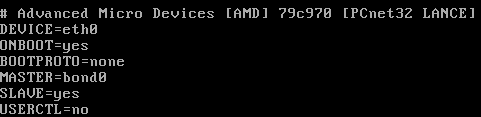
Now we edit /etc/sysconfig/network/network-scripts/ifcfg-eth0:


Now we edit /etc/sysconfig/network/network-scripts/ifcfg-eth1:

Network scripts are now complete in /etc/sysconfig/network/network-scripts:


Add the bonding driver to /etc/modprobe.conf:


Shut down the network with 'service network stop'
Insert the bonding driver with 'modprobe bonding -o bond0 miimon=100 mode=1'
Start the network with 'service network start':

Check the interfaces with 'ifconfig':


Check the routing is ok with 'route -n':


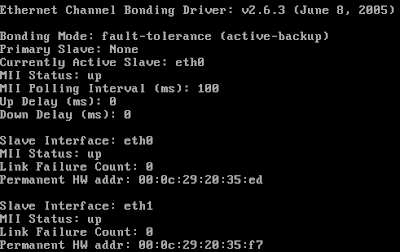
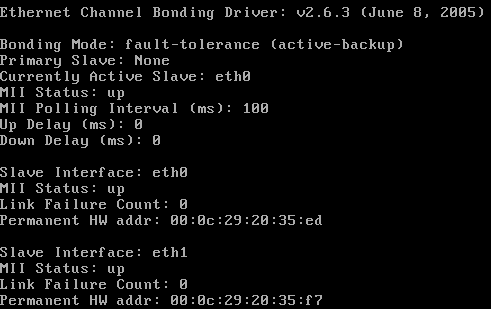
View the status with 'cat /proc/net/bonding/bond0':

Tuesday, 28 November 2006

IE7 Download Corruption

I have a particular file that I needed to download but IE7 consistantly corrupts it. It works fine with Firefox 2 and Free Download Manager. There is a strange dialog at the end of the download. This is a Print Screen capture:


It's not quite accurate because the progress bar is still there on the screen and there is a quarter of a (close?) button at the right hand end of the of where the progress bar would end.


I took a photo because I didn't seem able to Print Screen the dialog properly (bits were missing as above)

Friday, 24 November 2006

The Office Open XML file Building Blocks.dotx cannot be opened because there are problems with contents

I had a real problem with B2 Technical Refresh of Office 2007 not allowing me to insert page numbers, giving me the error message "The Office Open XML file Building Blocks.dotx cannot be opened because there are problems with contents."

Thanks to "PJ-DJ" I found the answer here:
http://forums.microsoft.com/TechNet/ShowPost.aspx?PostID=932036&SiteID=17

Step 1: Close Word and Outlook if you are using Word as your email editor.
Step 2: Go to C:\Documents and Settings\(Username)\Application Data\Microsoft\Document Building Blocks\1033 and delete the Building Blocks.dotx file.
Step 3: Open Word. CLOSE IT AGAIN. Wait a few seconds.
Step 4: Open Word. On a blank document, Insert Page Numbers. Check your C:\Documents and Settings\(Username)\Application Data\Microsoft\Document Building Blocks\1033 folder. A new Building Blocks.dotx file should have been created.
Step 5: There is no Step 5. You should be fine now.


I really must get that licensed copy of Office 2007 installed - But I'm not sure if Sharepoint designer is released?

Thursday, 23 November 2006

Gissa Job?

Things aren't going too well at work - The direction the company wants to take and the direction I want to take do not match!

Anyone need a technical type of guy?

I prefer to work around the Ipswich, Suffolk area and you can find a general purpose CV in PDF format here.

If you need it in another format, give me a shout.

Sunday, 12 November 2006

CS 2.1 SP 1 Fixed Comment Review Problem

I've just applied CS 2.1 SP1 and it fixed my comment review problem described earlier. [:D]

Saturday, 28 October 2006

CS2.1 Review Comments does not display correctly in IE7

I have to review comments before I allow them to be posted on the site because, as all blog owners know, you get a lot of spam comments. IE7 doesn't want to let me review them in lower resolutions. I get a cut off review line with no horizontal scroll bar. See what I mean here.

Firefox 2.0 fares better. It wraps the comment line and lets me scroll the windows horizontally if I have a long comment title. The colours are a little bit weird but I can live with that. See how Firefox 2.0 copes here.

I've posted a bug to the support forum so lets see how that does.

Sunday, 15 October 2006

Vista and Outlook 2007 - Turn off the reading pane

I really don't get on with the Outlook 2007 reading pane because it uses up to my screen real estate on my laptop. I knew that you can turn it off with the "/nopreview" switch at the command line but you can't edit the special icon to change the startup command line.

I did a bit of digging and found that by selecting the "Command Line" option from the Task Manager "View > Select Columns..." entry you could see the actual command lines used to start processes. I could see that Outlook was already starting with the "/recycle" switch to reuse Outlook instances so I set out to find this in the registry.

To start Outlook with the "/nopreview" switch I edited the following registry entry. (Insert standard disclaimer here!) The registry key was:
HKLM\SOFTWARE\Clients\Mail\Microsoft Outlook\shell\open\command
REG_SZ: "C:\PROGRA~1\MICROS~3\Office12\Outlook.exe" /recycle /nopreview

Sunday, 1 October 2006

Exchange Server 2007 Beta2 Maximum Mail Stores

I was trying to work out the limits of the current beta of Exchange 2007 in terms of storage groups and mailbox stores and through experimentation I discovered that they are:
  • Maximum Storage Groups: 50
  • Maximum Mail Stores per Storage Group: 5
I guess that's a grand total of 250 mailbox stores then. That's a massive improvement over Exchange 2003!

Grant full mailbox permissions in Exchange 2007 Beta2

Final step upon upgrading the test server to Exchange 2007 Beta2 was to give me full access to all the mailboxes. It's another Power Shell task and I managed to find the syntax at the Microsoft Exchange Team Blog.

Add-MailboxPermission mailbox -AccessRights FullAccess -user user

This gives user full access permisions to mailbox.

Exchange 2007 Beta2 - Allow hub connector to receive unauthenticated SMTP mail

You need to set the permissions to allow Anonymous users to submit mail. This is not in the GUI so you must use the Power Shell.

1. Set the permission:
set-receiveconnector 'Default CHEF' -PermissionGroups:"ExchangeUsers,ExchangeServers,ExchangeLegacyServers,AnonymousUsers"Replace CHEF with your Exchange server name!

2. Verify the permission:
get-receiveconnector | format-listSchema: Microsoft.Exchange.Data.Directory.SystemConfiguration.ReceiveConnectorSchema
AuthMechanism: Tls, BasicAuth, BasicAuthPlusTls, ExchangeServer
Banner:
BinaryMimeEnabled: True
Bindings: {0.0.0.0:25}
ChunkingEnabled: True
DefaultDomain:
DeliveryStatusNotificationEnabled: True
EightBitMimeEnabled: True
EnhancedStatusCodesEnabled: True
ExternallySecuredAsPartnerDomain:
Fqdn: mail.thefoleyhouse.co.uk
Comment:
Enabled: True
ConnectionTimeout: 00:10:00
ConnectionInactivityTimeout: 00:05:00
MessageRateLimit: unlimited
MaxInboundConnection: 5000
MaxInboundConnectionPerSource: unlimited
MaxInboundConnectionPercentagePerSource: 100
MaxHeaderSize: 64KB
MaxHopCount: 30
MaxLocalHopCount: 3
MaxLogonFailures: 3
MaxMessageSize: 10MB
MaxProtocolErrors: 5
MaxRecipientsPerMessage: 5000
PermissionGroups: AnonymousUsers, ExchangeUsers, ExchangeServers, ExchangeLegacyServers, CustomPipeliningEnabled: True
ProtocolLoggingLevel: None
RemoteIPRanges: {0.0.0.0-255.255.255.255}
RequireEHLODomain: False
RequireTLS: False
Server: CHEF
SizeEnabled: True
TarpitInterval: 00:00:05
AdminDisplayName:
ObjectCategoryName: msExchSmtpReceiveConnector
ExchangeVersion: 0.1 (8.0.535.0)
CurrentObjectVersion: 0.1 (8.0.535.0)
Name: Default CHEF
DistinguishedName: CN=Default CHEF,CN=SMTP Receive Connectors,CN=Protocols,CN=CHEF,CN=Servers,CN=Exchange Administrative Group (FYDIBOHF23SPDLT),CN=Administrative Groups,CN=The Foley House,CN=Microsoft Exchange,CN=Services,CN=Configuration,DC=thefoleyhouse,DC=ad
Identity: CHEF\Default CHEF
Guid: 0675a1d2-9c19-4068-af33-782d1c27f562
ObjectCategory: thefoleyhouse.ad/Configuration/Schema/ms-Exch-Smtp-Receive-Connector
ObjectClass: {top, msExchSmtpReceiveConnector}
OriginalId: CHEF\Default CHEF
WhenChanged: 01/10/2006 19:58:31
WhenCreated: 30/09/2006 00:19:26
ObjectState: Unchanged
OriginatingServer: chef.thefoleyhouse.ad
IsReadOnly: False
Id: CHEF\Default CHEF
IsValid: True

How to set recipent email addresses in Exchange 2007 Beta2

To set recipient email address policy, do the following:

1. In the Exchange Management Console, navigate to 'Organization Configuration' > 'Hub Transport' > 'Email Address Policies'. Here you will see the default policy and you can select 'Edit' on the left hand side of the MMC console.


2. We are editing the default policy so just click 'Next'.


3. Again, just select 'Next' because we are editing the default policy for all objects.


4. Now edit the default email address. Because mine is set as an alternate UPN I can click the SMTP address and click 'Edit'.


5. As the email address I want to use is an alternate UPN and can select it from the drop down box and select 'OK'.


6. Click 'Next' to apply changes immediately.


7. Click 'Edit' to make the changes.


8. This dialog shows the Power Shell script along with any warnings. I have an invalid recipient name from my old Exchange 2003 organisation that I must get round to changing! ;-)


9. All done and applied. I like how the 'True' display lets you know that you did apply the policy.

Creating an Internet send connector in Exchange 2007 Beta 2

Before you can send mail to the internet with a single server you have to make a connector for your mail transport hub role. The remote domain should already be configured to '*' for the Internet but create a send connector like so:

1. Open up the Exchange Management console and select Organization Configuration > Hub Transport and click 'New Send Connector...' underneath Actions, Hub Transport on the right hand side.


2. You should now get the 'New SMTP Send Connector' dialog box. Enter 'Internet' for the name and leave the intended use at 'Custom' for this connector.


3. Next, for the Domain enter '*' and ensure that you leave 'Include all subdomains' selected.


4. Next, choose if you are going to use a smarthost or MX records to deliver mail. Because a lot of administrator block dynamic IP addresses and this test server has a dynamic address I have elected to use my ISP mail server. They relay mail from my IP address and I have used the DNS name of the server to simplify the connection.


5. Next, if you need to authenticate to your smart host, put the details in here. I don't.


6. Next, select the server that will send mail over the connector. If you only have one server it should already be added.


7. Next, verify the settings.


8. Next, create the connector. Beta 2 lists the Power Shell command you could have used to create this connector from the command line.


9. All done.

Updating a single Exchange 2003 server to Exchange 2007 Beta 2

I've done this on my test server and there are a couple of problems you have to deal with:
  • The databases are not compatible. Exchange 2003 uses STM and EDB files with 5MB logs whereas Exchange 2007 uses just an EDB file with 1MB logs. There may also be a difference on how data is organsied internally. I have seen reports of 4KB vs 8KB database pages.
  • Exchange 2007 really needs an edge server role for secure deployment. If you're going to use a single server then you'll have to use the hub transport server to send and receive internet email. Allthought his works, it is not a reccommended scenario.
The steps I took to upgrade my Exchange server then were as follows.
  1. Backup everything.
  2. Backup everything again using a different method. :)
  3. Extract the mail from the old Exchange 2003 server using a tool such as ExMerge.
  4. Disable\Delete all old mailboxes from mail stores.
  5. Uninstall Exchange 2003.
  6. Install Exchange 2007 using the mailbox, client access and hub transport roles.
  7. Set recipient policy to ensure correct email addresses are allocated.
  8. Re-enable mailboxes.
  9. Test internal mail connectivity using owa.
  10. Import mail. As it was a small test organisation and I had removed the old server I used Outlook for each user to import thier own mail. If I had a new server then I could have installed it into the Exchange 2003 organisation and used the move mailbox wizard.
  11. Create an SMTP send connector.
  12. Allow unauthenticated SMTP connections on the incoming (default) SMTP connector.
  13. Setup any mailbox permissions you wish to have.
It now seems to be working. Watch out for more details on steps 7,11,12 and 13. Some of this can be done using the GUI, some using Power Shell.

Friday, 29 September 2006

Exchange 2003 will not uninstall with error 0x8000ffff

Ok, I have a development server that runs Exchange 2003 as a testbed but I wanted to try Exchange 2007b2 on this box. I thought about reinstalling the box but feeling slightly lazy I decided to remove Exchange 2003 and install Exchange 2007b2. Except I couldn't.....

"Unexpected error 0x8000ffff" so the dialog box said. On examining the log file in the root of C:, the first mention of error 0x8000ffff was in relation to not being able to find the CD. Except it hadn't asked me for the CD.....

On further examination it turned out (I remember now) that I had mounted the Exchange 2003 install CD iso image using Daemon tools and shared them across the network. The error 0x8000ffff was because it couldn't find the share. I shared the iso from the same machine and same sharename and presto! It worked!

How to control OWA spell checker in Exchange 2003

Microsoft KB article 825430 details registry changes for controlling OWA. I came across it when looking for a solution to the error message "The spelling in this item can't be checked. Please try again later."

I think this problem is caused by organisational proxy servers (seen with both ISA and Border Manager) so there's not a lot you can do about someone elses proxy. Microsoft KB article 820378 has more details.

Thursday, 28 September 2006

SuSE 10.1 "eth0 renamed to eth1"

After playing with the bcm43xx wireless module I noticed my eth0 had been renamed to eth1, indeed the message also appeared in dmesg output:

dmesg | grep eth1
eth0 renamed to eth1

After a bit of poking I found duplicates of my network card mac address in the following file:

cat /etc/udev/rules.d/30-net_persistent_names.rules
SUBSYSTEM=="net", ACTION=="add", SYSFS{address}=="00:0d:56:37:58:8c", IMPORT="/lib/udev/rename_netiface %k eth0"
SUBSYSTEM=="net", ACTION=="add", SYSFS{address}=="00:90:4b:12:5f:fa", IMPORT="/lib/udev/rename_netiface %k wlan0"
SUBSYSTEM=="net", ACTION=="add", SYSFS{address}=="00:0d:56:37:58:8c", IMPORT="/lib/udev/rename_netiface %k eth1"
SUBSYSTEM=="net", ACTION=="add", SYSFS{address}=="00:0d:56:37:58:8c", IMPORT="/lib/udev/rename_netiface %k eth2"
SUBSYSTEM=="net", ACTION=="add", SYSFS{address}=="00:0d:56:37:58:8c", IMPORT="/lib/udev/rename_netiface %k eth3"
SUBSYSTEM=="net", ACTION=="add", SYSFS{address}=="00:0d:56:37:58:8c", IMPORT="/lib/udev/rename_netiface %k eth4"

Removing the extra lines (eth1-eth4) and restarting the network caused eth0 to behave again.

Monday, 25 September 2006

How to enable remote desktop.... Remotely!

I recently removed terminal services from my test server as I was through with it and the evaluation license was about to run out. When I tried to connect to my headless server using remote desktop I found that it was disabled by the removal of ts.

Thanks to a blog by cogent free knowledge I was able to enable remote desktop remotely.

Using regedt32, connect to the remote machines registry and change the following key from 1 (disabled) to 0 (enabled):
KEY: HKEY_LOCAL_MACHINE\SYSTEM\CurrentControlSet\Control\TerminalServer
DATA: fDenyTSConnections

No need to reboot, it works straight away.

Thursday, 21 September 2006

Using the bcm43xx driver with SuSE 10.1 and Dell Inspiron 5100

As of Kernel 2.6.17rc a native, reverse engineered, driver is available for bcm43xx range of wireless cards. I have had my bcm4306 rev 02 (Dell Truemobile 1300) card working in my Inspiron 5100 using ndiswrapper for some time but wanted to get the native driver working to play with tools such as kismet.

You'll need the following files:

Kernel.
Novell have not provided a kernel later than 2.6.16 so I had to find a more up to date one. I eventually settled on the 2.6.18rc7 one from the factory distributioncalled kernel-default-2.6.18_rc7_git1-2.i586.rpm. I can't store a copy here because community server does not seem to handle files that big.

Wireless tools.
The wireless tools provided with SuSE 10.1 do not seem to configure the new wireless driver correctly to I again used the rpm from the factory distribution.

bcm43xx-fwcutter-004.
This tool is required to extract firware from the windows driver to make the card work with Linux. You can find the file from the makers siteor use this local copy. I have a precompiled version here too.
A windows driver.
I had been using thedell driver with ndiswrapper with no problems but it would not work with bcm43xx giving me IRQ errors. I eventually found this onewhich worked great for me.

Proceedure.
1. Install the new kernel using a command similar to 'rpm -ivh kernel-default-2.6.18_rc7_git1-2.i586.rpm'. Reboot into the new kernel but be aware that if you were using ndiswrapper it will no longer work because the new kernel will prefer to use bcm43xx instead.

2. Install the new wireless tools. Because Yast2 and a few other pieces of software require the previous version of wireless tools you will get a dependency error on libiw.so.28. I used the following commands to get around this:
'rpm -Uvh –nodeps wireless-tools-29pre10-5.i586.rpm'
'ln -s /usr/lib/libiw.so /usr/lib/libiw.so.28'

3. Install the fwcutter tool from source or by copying the precomiled binary. Installing from source is the standard:
'./configure'
'make'
'make install'

4. Extract the firmware from the wl_apsta.o file using a command similar to:
'bcm43xx-fwcutter -w /lib/firmware wl_apsta.a'
This should place a load of bcm43xx* files into /lib/firmware.
5. Use Yast2 to configure your wireless card and reboot.
You should see output similar to the followig:

ifconfig wlan0
wlan0 Link encap:Ethernet HWaddr 00:90:4B:12:5F:FA
inet addr:192.168.0.51 Bcast:192.168.0.255 Mask:255.255.255.0
inet6 addr: fe80::290:4bff:fe12:5ffa/64 Scope:Link
UP BROADCAST RUNNING MULTICAST MTU:1500 Metric:1
RX packets:30401 errors:0 dropped:220 overruns:0 frame:0
TX packets:61069 errors:0 dropped:0 overruns:0 carrier:0
collisions:0 txqueuelen:1000
RX bytes:3078309 (2.9 Mb) TX bytes:87433000 (83.3 Mb)
Interrupt:11 Base address:0xc000

iwconfig wlan0
wlan0 IEEE 802.11b/g ESSID:"thefoleyhouse" Nickname:"Broadcom 4306"
Mode:Managed Frequency=2.412 GHz Access Point: 00:15:E9:E1:C9:15
Bit Rate=11 Mb/s Tx-Power=15 dBm
RTS thr:off Fragment thr:off
Encryption key:XXXX-XXXX-XX Security mode:open
Link Quality=100/100 Signal level=2/3 Noise level=187/100
Rx invalid nwid:0 Rx invalid crypt:0 Rx invalid frag:0
Tx excessive retries:0 Invalid misc:0 Missed beacon:0

lsmod |grep bcm43xx
bcm43xx 427776 0
firmware_class 14208 2 pcmcia,bcm43xx
ieee80211softmac 36992 1 bcm43xx
ieee80211 34760 2 bcm43xx,ieee80211softmac

Test Blog From Word 2007B2TR

Just thought I'd test "Publish to blog" from Word 2007B2TR. We'll see if it works!
And what about pictures?

Windows Genuine Advantage - Internet Connection Problem [0x80080293]

It's all well and good having Windows Genuine Advantage so that only licensed users can download products and fixes but surely the servers should be highly available or it defeats the purpose? I have a problem with Windows Defender not carrying out scheduled scans and I deceided to reinstall it as a troubleshooting step. Despite having validated my copy of Windows XP many times in the past (repeatedly!) I can not currently download Windows Defender:

Wednesday, 20 September 2006

Disgusting Keyboard

When my keyboard has got really bad in the past I just bought a new one. Today I decided to clean it:


After I took all the keys off:


After I cleaned it:


All back together again:

Blog Updated to CS2.1

I did a couple of trial runs on this and found the best option was to do a complete in place upgrade.
I first upgraded the database:
  • CS1.1>CS2.0
  • CD2.0>CS2.1
  • ASP1.1>ASP2.0
Then just extracted the new website over the old one. I initially tried creating a new website but had lots of prolems with the old photos!

Friday, 8 September 2006

Windows Live Messenger Setup Problem

I was told that a new version of Windows Live Messenger (v8.0.0812.0) was available so I downloaded it.
Problem is that I had to cancel setup for setup to continue because the "Windows Live Messenger Setup Wizard" tells me it can't run whilst the "Windows Live Messenger Setup Wizard" is running. There was only one copy running, honest!
[*-)]


Tuesday, 29 August 2006

Device Manager Empty

This has happened to me a number of times now. All of a sudden, plug and play hardware stops working and when you go into the device manager it all appears blank. Microsoft KB311504 suggests that this is caused by the Plug and Play service being stopped but this was not my problem.

My problem was that the HKLM\System\CurrentControlSet\Enum registry key was lacking permissions. Use REGEDT32 (Windows 2000) or REGEDIT (Windows XP) to add the System account with full control and Everyone with read to make this work again.

Saturday, 12 August 2006

AV Filtering mail with Evolution

This site has a nice script to run each incoming mail through ClamAV and to display a warning and move it to a quarentine folder if it contains a virus.
Thanks to Fred Blaise.

Saturday, 1 July 2006

XGL on Dell Inspiron 5100 with SUSE 10.1

This documents my attempt to install XGL on my Dell Inspiron 5100 laptop using Suse 10.1. I first tested it with the Kororaa Xgl Live CD so I knew that it would work. I had some problems with the login screen (seen this reported elsewhere - but I don't have it with SUSE 10.1) but overall it worked well. The following procedure works for me!
First a bit on hardware:
  • Dell Inspiron 5100
  • Radeon 7500 Mobility with 32 MB Video RAM
  • Using Xorg "radeon" driver with 3d dri enabled
I mainly followed the procedure on Opensuse.org here.

Download the following RPMs from Suse factory i586:
Download the following RPM from Suse factory noarch:
Install the RPMs. I had a dependency issue when I tried this:
  • error: Failed dependencies: libpng12.so.0(PNG12_0) is needed by compiz-cvs_060621-2.i586
  • I used --nodeps and it installed with no apparent side ill effects. There is a libpng12.so.0 in /usr/lib provided from libpng-1.2.8-17 so I am not sure why I got the error.
Make sure that you have enabled 3d acceleration from YaST:
(Image lost due to Blog move)

Activate the desktop effects from the Gnome Control centre:
(Image lost due to Blog move)

It didn't work for me first time because it said 3D acceleration enabled although it was. I saw this:
(Image lost due to Blog move)

When I checked the status with glxinfo I got this so I know it's working:
  • name of display: :0.0
  • display: :0 screen: 0
  • direct rendering: Yes

After a bit of research I found the XGL control applet sometimes does not identify that 3d acceleration is enabled and that if you hold shift and double click on “3D Acceleration: Disabled” then you can force it to on:
(Image lost due to Blog move)

You can now click on “Enable Desktop Effects” and you now have XGL!
The only problems I have are:
  • I occasionally get lines or corrupted pixels on screen. A quick spin of the cube (CTRL+ALT+ARROW) sorts these out quickly.
  • Windows have pink lines around them after restoring from hibernation. I have to restart the X server to sort these out.
  • The display does not handle full screen dvd video very well. Either use a hardware player (!) or turn of desktop effects to be able to play video at any decent speed.

Saturday, 24 June 2006

VMware on Suse 10.1

I've tried using CrossOffice to run MS Office applications on Linux but you really can't beat VMWare with an XP guest machine to run Outlook. That is unless you can't get VMWare to run. Thanks to Nilesh Bansal, now I can. 

SUSE 10.1 Wireless on Dell Inspiron 5100

As always I had to use ndiswrapper to get my wireless working but this time was the easiest ever. I followed the following proceedure:
  1. Downloaded the latest drivers for my minipci from here. Bear in mind that I am in the UK so these are the non US/Japan drivers. Click here if you want the US or Japanese drivers. (If you don't want to download the 48MB packages you can find the UK bcmwl5.inf and bcmwl5.sys as a download here.)
  2. Used Yast to install ndiswrapper. It seems that Novell have split the drivers into tools&docs in one package and kernel modules in another. I selected ndiswrapper-1.10-19 in Yast and it auto selected ndiswrapper-kmp-default-1.10_2.6.16.13_4-19 for my Kernel.
  3. Followed the instructions I found in /usr/share/doc/packages/ndiswrapper/README.SUSE. (Copy here.)
  4. The only thing that didn't work was the WEP key instructions. Because I elected to use the new user mode network control I had to use the Network applet to join the wireless network.
    (Image lost due to Blog move)

Moving from Vista to Suse 10.1

With my laptop failing and having to send it back to Dell for repair it seemed an ideal opportunity to try out the latest beta of Vista (beta 2). Unfortuneatelty my graphics card (Mobility Radeon 7500) didn't let me use Aero and I had quite a few problems with beta 2:
  • Mouse clicks sometimes not registered on desktop (same with default detected device and downloaded synaptics driver)
  • Some 700MB out of 1GB of memory in use when just on desktop (!)
  • Slow response
So, I decided to move back to Suse only this time I will try 10.1 with XGL so watch this space! I know XGL will work because I tried the Kororaa XGL Live CD v0.2.

Saturday, 27 May 2006

Playing with Exchange 12

I had my first look at Exchange 12 yesterday and had huge problems getting it to install. You have to have MMC 3.0 installed but even though it was installed, the install claimed it wasn't.

I found the answer on the Exchange EHLO blog.

Create this registry key:
HKEY_LOCAL_MACHINE\SOFTWARE\Microsoft\Windows\CurrentVersion\Uninstall\MMC30Core

Blocking hackers access to SSH

Since putting a Suse 10 box on the internet and allowing SSH through the firewall we have been getting attempts like this on a regular basis:

May 27 09:14:20 nprobe sshd[689]: Did not receive identification string from 140.136.158.182
May 27 09:20:40 nprobe sshd[816]: Invalid user aaa from 140.136.158.182
May 27 09:20:43 nprobe sshd[818]: Invalid user aaa from 140.136.158.182
May 27 09:20:46 nprobe sshd[820]: Invalid user aaa from 140.136.158.182
May 27 09:20:49 nprobe sshd[822]: Invalid user aaaudio from 140.136.158.182
May 27 09:20:52 nprobe sshd[824]: Invalid user aaaudio from 140.136.158.182
May 27 09:20:55 nprobe sshd[826]: Invalid user aaaudio from 140.136.158.182

Found a cool script on the Novell cool solutions web site that scans the system logfile and then blocks access from the systems that have been trying to gain access with invalid user names.

I followed the reccomendation to modify the script for Suse 10 and this worked for me:

#!/bin/bash
LAST_IP=0.0.0.0
COUNT=1

# Set MAXCOUNT to the maximum failures allowed before blacklisting
MAXCOUNT=5

#
# The three lines below put the leading lines in /etc/hosts.allow
# Note: This script overwrites the entire /etc/hosts.allow file.
#

echo '
# /etc/hosts.deny
# See "man tcpd" and "man 5 hosts_access" as well as /etc/hosts.allow
# for a detailed description.
http-rman : ALL EXCEPT LOCAL' > /etc/hosts.deny

#
# Scan the /var/log/messages file for failed login attempts via ssh.
# Parse out the IP address, and count the failure occurances from that IP
# If the IP fails more than 5 times - deny further access
#

for IP in `/bin/grep sshd /var/log/messages|/bin/grep "Invalid user"|/bin/sed 's/^.*from //'` 0.0.0.0; do
if [ ${LAST_IP} == ${IP} ]; then
let COUNT=${COUNT}+1
else
if [ ${COUNT} -ge ${MAXCOUNT} ]; then
echo "ALL: ${LAST_IP}/32" >> /etc/hosts.deny
fi
LAST_IP=${IP}
COUNT=1
fi
done

Thursday, 13 April 2006

PC line PCL-RP100 Rumble Game Pad

I always like to install the latest drivers but when buying OEM hardware it proves difficult to track down the drivers.

For this particular device it proved to be a company called Ruling Technologies.
I am also informed by Glen that:
Is the manufacturer, drivers are by Padix (same company)
Work fine with XP but not with Vista
Enjoy :-)

Blog Offline

Ooops. Blog has been offline for a couple of days because I had a server issue. Seems one of my recurring SQL jobs didn't finish within 24 hours and got it's knickers in a right old twist. Disk utilisation was through the roof and I stopped IIS services as a troubleshooting step. Problem was, I forgot to restart them!

Strange thing with the SQL job was I restared SQL server and the job (SMTP Log Trim) ran manually fine..... Hmmmm....

Wednesday, 29 March 2006

Updating the Java plugin in Firefox

 I was trying to use Logmein from my Suse 10 Linux laptop but the Java viewer kept crashing. Despite installing JVM 1.5 the plugin was still showing v1.4.2. I eventually found the plugin directory was /usr/lib/firefox/plugins and had to create a link from here to replace the Java v1.4.2 one.

The command I used was:
ln -s /usr/java/jre1.5.0_06/plugin/i386/ns7/libjavaplugin_oji.so /usr/lib/firefox/plugins/libjavaplugin_oji.so

The Mozilla plugin directory is /opt/mozilla/lib/plugins so adjust accordingly.

The Java verifier now shows both browsers using JRE 1.5.0_06 and Logmein works!

Thursday, 16 March 2006

OES and Imanager not working

Playing with OES and could not get iManager working. Turns out you have to disable IPv6.

Novell TID 10098152 tells you how:

The following steps should be followed to disable IPV6 on SuSE Linux Enterprise Server 9:
1- Modify /etc/modprobe.conf.local by adding the following:
#
# please add local extensions to this file
#
install ipv6 /bin/false
2- reboot

*** In some circumstances, it is also necessary to modify the /etc/modprobe.conf and change the following:

alias net-pf-10 ipv6
to
alias net-pf-10 off

Sunday, 12 February 2006

ClustrMaps Beta

Just added ClustrMaps Beta to the blog - Just to get an idea where hits are coming from.

Thanks to Dugie for the idea.

Monday, 9 January 2006

How to remove ADC-GLOBAL-NAMES attribute

Had a problem with a mixed Exchange 5.5/2003 system where some Exchange 5.5 directory entries were refusing to synch into the Active Directory. Turns out the 5.5 directory entries were pointing to non-existent AD entries. I had to remove the ADC-GLOBAL-NAMES attributes by running Exchange 5.5 Administrator in raw mode (c:\exchsrvr\bin\admin.exe /r). Having done this, a full sync of the ADC got everything working again.

More details in Micrsoft support article 319474.

Unable to install Microsoft .Net 2.0 Framework

I've had a Windows update refuse to install on a couple of machines which are used for software testing. Turns out these machines had Microsoft .Net Framework 2.0 beta1 and Visual J# Redistributable beta1 installed.

Machine #1 was easy, I just went to add/remove programs and removed the beta stuff but machine #2 did not show the beta software to remove.

I found a Microsoft KB article Q320112 but I am always squeamish about manually deleting stuff from the registry so I did it a slightly different way.

Firstly I downloaded beta1 of .Net 2.0 and J# packages from here and here.

Then I used the installer cache to uninstall J#
  • Start > Run > Installer
  • Right Click Date Modified
  • Select Comments
  • Click Comments
  • Scroll down to find Visual J# Beta
  • Right click and uninstall
Then I installed it from the downloaded file

Then I uninstalled it from add/remove programs.

Repeat for Microsoft .NET Framework 2.0 beta1.

Finally I manually installed Microsoft .Net Framework 2.0 from here.

CS Gallery Upload Manager Added

I've added the rather awesome CS Gallery Upload Manager to this CS 1.1 based site. It allows bulk photo uploads from Windows into CS.

You can find CHiwi's Blog here.

CS 1.1 Gallery Service Extension is here.

CS Gallery Upload Manager (Works with CS 2.0 and 1.1 with above extenstion) can be found here.

Monday, 18 July 2005

Windows Server 2003 Access-based Enumeration

Ever wanted to hide the files and folders that a user did not have access too (just like them old NetWare days?), well now you can with Windows Server 2003 Access-based Enumeration.

Thanks to Brian McCann for this one.

Download the Admin tool.
Download the readme here.

Tuesday, 5 July 2005

Citrix ICA Web Client

This client needs either local administrator or power users rights to run correctly on the workstation. To allow normal users to run it, edit the permissions on this registry key:
HKLM\Software\Microsoft\MSLicensing - Users - Full control

You could this either manually or through group policy.

Monday, 4 July 2005

Installing Windows Sharepoint Services v2 to use SQL Server

You need to do two things:

1. Extract files to temp directory:
stsv2 /c /t:c:\temp\wssv2

2. Install to use external SQL:
c:\temp\wssv2\setupsts remotesql=true

Sunday, 3 July 2005

Upgraded to CS v1.1

I've upgraded the Server to CS v1.1.

It wasn't without problems - The main one was that the tables aspnet_Membership, aspnet_Users and cs_Userprofile did not agree with each other before the upgrade.

Thanks to Derek Larkin for the answer! He also has a blog here.

Saturday, 2 July 2005

MOM 2005 error SQL Server 2000 SP3 or later not detected

Trying to install MOM 2005 on a test 2003 Server only to receive the error message "SQL Server 2000 SP3 or later not detected".

Because I have SQL 2000 SP4 installed as an upgrade of an earlier MSDE incidence (and it seems MOM 2005 install does not detect SQL 2000 SP4 correctly) I had to temporarily change the following reg key:

HKLM\SOFTWARE\Microsoft\Microsoft SQL Server\MSDE\MSSQLServer\CurrentVersion"
CSDVersion REG_SZ change from "8.00.2039" to "8.00.761"

Do not be confused by the MSDE term - This was what the incidence was called before being upgraded to SQL Server 2000.

Don't forget to change it back!

Wednesday, 27 April 2005

Building an MS Cluster with VMWare Workstation 4.5.2

I used to be able to build clusters in VMWare Workstation 4, I'm sure, but when I recently tried it didn't seem to work any more. I found someone (sorry - lost the URL) on the VMWare forums who claimed to have created one on VMWare workstation 5. I tried thier suggestions on VMWare 4.5.2 and with a few changes it worked for me. I created the quorum (100MB) and shared disk (2GB) as fixed size SCSI devices.

Here are the important lines from my node_1.vmx file:

diskLib.dataCacheMaxSize = "0"
diskLib.dataCacheMaxReadAheadSize = "0"
diskLib.dataCacheMinReadAheadSize = "0"
diskLib.dataCachePageSize = "4096"
diskLib.maxUnsyncedWrites = "0"

disk.locking=FALSE

scsi0.present = "TRUE"
scsi0.virtualDev = "lsilogic"
scsi0:0.present = "TRUE"
scsi0:0.fileName = "Disk1.vmdk"
scsi1.present = "TRUE"
scsi1.virtualDev = "lsilogic"
scsi1.sharedBus = "virtual"

scsi1:1.present = "TRUE"
scsi1:1.fileName = "..\shared\quorum.vmdk"
scsi1:1.redo = ""
scsi1:1.mode = "independent-persistent"
scsi1:1.deviceType = "plainDisk"

scsi2.present = "TRUE"
scsi2.virtualDev = "lsilogic"
scsi2.sharedBus = "virtual"
scsi2:1.present = "TRUE"
scsi2:1.fileName = "..\shared\shared.vmdk"
scsi2:1.redo = ""
scsi2:1.mode = "independent-persistent"
scsi2:1.deviceType = "plainDisk"

Wednesday, 6 April 2005

Remove non-existant DFS root

I had to rebuild a DFS root but the 2000/2003 Servers and AD insisted the old one was there though it wasn't! I eventually found this KB article at Microsoft to fix it:
Article ID: 224384

Quickly reset users home directory permissions

This is not my work but that of Shawn Hopkins that I found on Google Groups.

I faced a situation where my users home and profile directories were ok but the users had simply lost their permissions (importing foreign disk, long story....). Shawn's scripts were written for NT but they worked fine with Server 2003. I did the following:

Gave Administrators full access to d:\home and d:\profiles.

Ran this:
net user /domain >> users.txt

Then ran this script:
for /f "eol=; tokens=1,2*" %%i in (users.txt) do cacls d:\home\%%i /T /E /G %%i:C
for /f "eol=; tokens=1,2*" %%j in (users.txt) do cacls c:\home\%%j /T /E /G %%j:C
for /f "eol=; tokens=1,2*" %%k in (users.txt) do cacls c:\home\%%k /T /E /G %%k:C

Then this script:
for /f "eol=; tokens=1,2*" %%i in (users.txt) do cacls d:\profiles\%%i /T /E /G %%i:C
for /f "eol=; tokens=1,2*" %%j in (users.txt) do cacls d:\profiles\%%j /T /E /G %%j:C
for /f "eol=; tokens=1,2*" %%k in (users.txt) do cacls d:\profiles%%k /T /E /G %%k:C

Monday, 21 March 2005

One of those D'OH! moments

Sometime last night (or more accurately in the early hours of the morning) my Server 2003 box decided it wasn't going to have a default gateway anymore. The problem first made itself known when we started getting "Mail Delayed" messages back from Exchange. On investigating the problem using Remote Desktop I found that even though a default gateway was set in the LAN properties, "ipconfig /all" and "route print" showed that the box wasn't honouring it. I then made the brilliant decision to disable and re-enable the LAN card.

D'OH! Remember, I was using Remote Desktop to do this! Luckily I had an EMS connection to the Server so I was able to re-enable the connection from there. I'm lucky that 2003 supports this, unlike 2000, else I would have to crawl around attaching cables to my headless server.
(Image lost due to Blog move)

One of those D'OH! moments

Sometime last night (or more accurately in the early hours of the morning) my Server 2003 box decided it wasn't going to have a default gateway anymore. The problem first made itself known when we started getting "Mail Delayed" messages back from Exchange. On investigating the problem using Remote Desktop I found that even though a default gateway was set in the LAN properties, "ipconfig /all" and "route print" showed that the box wasn't honouring it. I then made the brilliant decision to disable and re-enable the LAN card.

D'OH! Remember, I was using Remote Desktop to do this! Luckily I had an EMS connection to the Server so I was able to re-enable the connection from there. I'm lucky that 2003 supports this, unlike 2000, else I would have to crawl around attaching cables to my headless server.
(Image lost due to Blog move)

Sunday, 20 March 2005

Exchange 2003 OWA displays FTP style directory

If this happens to you the simplest answer is to recreate the web access directories. You can't just delete them and restart the SA service as you did in Exchange 2000!


1. Backup the IIS metabase
2. Delete the Exchange virtual directories in IIS Manager
3. Delete the /AD2MB path using ADSUTIL.VBS
4. Restart Exchange 2003 SA
5. Restore permissions to virtual directories

Microsoft has it covered here.

Monday, 14 March 2005

JRNL_WRAP_ERROR

Windows 2000 domain with a single domain controller was suffering the following error message in NTFRS Log in event viewer. After advice from Microsoft we set the following registry entry:

HKLM\System\CurrentControlSet\Services\NtFrs\Parameters\Backup/Restore\Process at Startup
BurFlags REG_DWORD 0xD2

This forces a non-authorative restore for SysVol and allows the message to disappear - Setting it to 0xd4 would have forced an Authoratative restore.

Thursday, 3 March 2005

Thursday Evening

Left at 19:00 to arrive at Ipswich at 20:11 but arrived at 20:17. Not bad, only 6 minutes late. We've gone ober the 3 hour barrier - Now we have it at 3:03 for the week so far but there is still Friday to go.

Thursday Morning

Caught the 06:53 to arrive at 08:09. Not bad as we arrived at 08:10 - Just a minute late. So that's now 2:57 late for the week.

Wednesday, 2 March 2005

Wednesday evenings...

Caught the 19:00 (had some work to catch up with) expecting to get into Ipswich at 20:11 but we eventually rolled in at 20:42. Some 33 minutes late. That brings the total lateness up to 2:56 for the week so far.

Wednesdays....

 I planned to catch the 6:23 again this morning as I needed to do some work on the way in but due to my bloody printer deciding it wasn't going to squirt ink out of the inkjets I ended up on the 06:38 again.

Due to a "delayed preceding freight train" we didn't arrive until 08:13 instead of 07:57. That's another 16 minutes making the total for the week 2:21 wasted.
Wednesdays!!

Tuesday, 1 March 2005

Tuesdays

After the problems with travel yesterday I decided to catch the 06:23 (couldn't face the 05:53) only to find it was canceled! Had to catch the 06:38 which arrived a minute early at 07:56. Still I calculate I had to waste 14 minutes because of the cancelation.

I caught the 18:30 back again (due 19:38) but it didn't arrive until 19:49. The reason give for my wasted 11 minutes was that there was a suspect package on the earlier train (18:20) that had to be dealt with by police.

Mon Out 00:26
Mon In 01:14
Tue Out 00:14
Tue In 00:11

Total late (So far) 02:05

TUESDAYS!!!

Converted to CS v1.0

CSVerter (Build 50301) finally worked for me. I think it was a combination of the new build and me using SQL authentication rather than Windows integrated that did it. This time the DTS packages were created and the blog content migrated.

Cheers Robert!

Monday, 28 February 2005

I hate Mondays (sometimes/mostimes)....

Training in London this week so caught the 06:38 into Liverpool Street from Ipswich which is supposed to arrive at 07:59 but didn't arrive till 08:25, some 26 minutes late. Arrived back at Liverpool Street to catch the 18:00 back to Ipswich to arrive at 19:08 but because the rail situation was all stuffed up I had to catch the 18:30. This did not make it into Ipswich until 20:22 so I was 1:14 late.

One state that engineering work will continue till 12:00 tomorrow causing 2 of the four lines going into London to be closed until then. We're told this will lead to alterations to service but I can't find any details of these!

Looks like I'll be catching the 05:53 tomorrow, so if I go to bed (been in for 20 minutes) now, I should just about manage 7 hours sleep!


MONDAYS!!!!!

Thursday, 24 February 2005

Firefox Font Problem

Does anyone know why Firefox has started doing this?
(Image lost due to Blog move)

It's not just on the rendered pages because it's doing similar weird font things in it's own dialogue boxes:
(Image lost due to Blog move)

Monday, 21 February 2005

Four hours in the future?

I'm unsure as to why my blog is posting four hours into the future (it's now 22:41 on 20/2/05)!

Blog to move

This blog will shortly move to Community Server v1.0. I have it setup and just need a way to move the existing post over - I did find some scripts but there is supposed to be and easy to use migration tool being released in the next few weeks.

It will be homed at http://cs.thefoleyhouse.co.uk/blogs/karl/.

Take a look at the whole skeleton Community Server at http://cs.thefoleyhouse.co.uk/.

Suse 9.2 fails to resume from disk

The saga of getting my Suse 9.2 box to behave as well as my Suse 9.1 box pre upgrade continues.

Slight problem with suspend to disk. Well, rather, the resume from disk just wasn't working.

After some digging I found that the 'resume=/dev/hdc5' entry was missing from '/boot/grub/menu.lst.'

I think there may also have been a problem with my swap partition so i did the following to be safe:
  • Checked '/etc/fstab' to make sure the swap partition was listed (it was)
  • Used the 'swapoff' command to disable swap (don't think it was being used but just to be safe)
  • 'mkswap /dev/hdc5'
  • Used 'swapon -a -v' to activate swap
Boot and general performances seems better/quicker so I suspect it was a problem.

Suse 9.2 Bootsplash not working

I installed Suse 9.1 home from downloaded CDROM's , upgraded it to 9.1 professional via the Suse website and then upgraded it again to 9.2 Professional from the downloaded DVD.

The Bootsplash screen was not working. After a bit of digging I found that the file '/etc/sysconfig/bootsplash' contained the line 'Theme="SuSE-Home" but that the SuSE-Home theme (bootsplash-theme-SuSE-Home.rpm) was no longer installed.

I did have the SuSE Professional theme (bootsplash-theme-SuSE) installed though so I edited the line to read 'Theme="SuSE"' which matched the name in the '/etc/bootsplash/themes' directory.

I executed mkinitrd which attached the appropriate image to the initrd and everything is sweet now.

Sunday, 20 February 2005

SSID is case sensative in Linux!

Now, you may know this, but I just wasted two days trying to get my wireless working again. I had some problems and re-did the wireless configuration but whatever I did I couldn't get any traffic to register on the wireless interface. Turned out that I did not have the same case for the SSID in /etc/sysconfig/network/ifcfg-wlan0 that I did on the access point.

Note to self:
WIRELESS_ESSID='TheFoleyHouse' != WIRELESS_ESSID='thefoleyhouse'

Thursday, 17 February 2005

How to prevent Squid caching .asp pages

We need to access a (poorly behaved) website at work and it doesn't play nice with Squid. I've put the following in to try and force it not to cache .asp pages no matter what the cache settings are.

refresh_pattern \.asp$ 0 0% 0
refresh_pattern \.aspx$ 0 0% 0

Saturday, 12 February 2005

Friday, 11 February 2005

Installing Mplayer on Suse 9.2

Just add Packmans source: Protocol: http Server: packman.iu-bremen.de Path: suse/9.2

Using MPlayer to RIP Realmedia files on Linux

Found an interesting article here which describes the command line sytax required: http://gentoo-wiki.com/HOWTO_Rip_Streams_With_MPlayer

Firefox showing Real Media content

I had some problems getting Firefox to use the RealPlayer plugins today so I just had to link them in:

# cd /opt/MozillaFirefox/lib/plugins
# ln -s /usr/local/RealPlayer/mozilla/* .

Capturing RM media files

I found a nifty little prog to capture Real Media streaming files today called Stream Down.
http://stream-down.cocsoft.com/

Red-carpet problems with Suse 9.2

I wanted to install the latest Evolution\Ximian connector for Exchange combination but I had quite a few problems with the red carpet daemon crashing on me. I verified it was crashing by using "sux -" to switch to root and then ran it in non-daemon mode "rcd -n". After reviewing the errors it seemed to have a problem so I looked at /var/log/rcd/rcd-messages:

...
Feb 11 15:39:55 [6811] Unable to download service info: IO error - Soup error: Connection terminated unexpectedly (7)
Crash!
rcd has crashed.
Attempting to write backtrace to /tmp/rcd-crash.23380
Error while mapping shared library sections:
...

I couldn't get it working again so I downloaded the latest red-carpet and red carpet daemon. They were hard to find but I found them here:
rcd-2.4.5-0.ximian.10.2.i586.rpm
red-carpet-2.4.4-0.ximian.10.1.i586.rpm

After some experimentation I was able to get it to start again by using the command line "rcd -n -m" so as not to load any modules. After this I managed to start it again normally using "/etc/init.d/rcd start".

Red-carpet problems with Suse 9.2

I wanted to install the latest Evolution\Ximian connector for Exchange combination but I had quite a few problems with the red carpet daemon crashing on me. I verified it was crashing by using "sux -" to switch to root and then ran it in non-daemon mode "rcd -n". After reviewing the errors it seemed to have a problem so I looked at /var/log/rcd/rcd-messages:

...
Feb 11 15:39:55 [6811] Unable to download service info: IO error - Soup error: Connection terminated unexpectedly (7)
Crash!
rcd has crashed.
Attempting to write backtrace to /tmp/rcd-crash.23380
Error while mapping shared library sections:
...

I couldn't get it working again so I downloaded the latest red-carpet and red carpet daemon. They were hard to find but I found them here:
rcd-2.4.5-0.ximian.10.2.i586.rpm
red-carpet-2.4.4-0.ximian.10.1.i586.rpm

After some experimentation I was able to get it to start again by using the command line "rcd -n -m" so as not to load any modules. After this I managed to start it again normally using "/etc/init.d/rcd start".

Evolution Upgrade Problems

Evolution caused me a small headache in my 9.1 to 9.2 update. I had a developer snapshot installed so the upgrade program didn't know how to install around it. I decided to simply remove the old version first and upgrade any libraries by choosing the "remove protection" option. I plan to reinstall the latest evolution version post upgrade.

Upgrade from Suse 9.1 to 9.2

Took a chance today to upgrade my Dell Inspiron 5100 laptop from Suse 9.1 to Suse 9.2 and it all went rather well. I had a few minor problems which I'll deal with separately.

Sunday, 6 February 2005

Thank you Miguel Jimenez!

Well, having found the term Captcha and having done a little digging you can see that each comment page now requires you to enter a validation code - This should stop all of the automated comment spam I've been getting and it was incredibly easy, taking just a few minutes to setup.

I owe you a beer Miguel!

Here's the great bit of code:
http://blogs.clearscreen.com/migs/archive/2005/02/01/905.aspx

Saturday, 5 February 2005

Comments still a problem

Still getting hit by lots of comment Spam.

Community Server RC2 was released last night so I'm going to put this on test.

When this is released it effectively becomes version 1.00 of Text and it has some anti-comment spam features. Theere has been some discussion of the same for Text 0.95 but I'm not yet able to recompile (I have got a copy of VS .Net so I may give it a go).

Here are the suggestions for changes and here is a set of updated SQL statements for 0.95 which apparently fix a few problems.

I've seen mention of something called "CAPTCHA" and also suggestions of using an event handler.

Comments

I'm going to try switching comments back on to see what happens.
Adam Kalsey seems to use a blacklist system of some type - Might be worth investigating.

Wednesday, 2 February 2005

Update to Exchange IMF out Now

IMF has been letting through a bit of spam recently but have no fear, a new version is here!

You can download it from the Microsoft download centre.

Sunday, 30 January 2005

How to turn off comments in .Text

For me the GUI doesn't allow it so I simply used DbaMgr2K to edit the .Text SQL tables directly. I changed the Flag field in table blog_Config from 63 to 47. The value 16 is the binary switch to allow comments on or off.

Commenting turned off

As I'm currently being swamped with feedback spam for "On-line Casinos", I've temporarily turned off commenting. You can leave any comments you wish here.

Comment Spam

Got my first blog comment spam today. Shame I subscribe to this way of thinking. ;-)

Thursday, 27 January 2005

How to change the default route in Cisco IOS

Type the following. Replace text with your own values:


telnet hostname
password

enable username
passwordconf t
ip route 0.0.0.0 0.0.0.0 gatewayip^Z
write mem
show ip route
exit

Thursday, 13 January 2005

Do not move the Exchange groups!

Two groups (Exchange Enterprise Servers and Exchange Domain Servers) are created during Exchange "setup /domainprep".
One group (Exchange Services) is created during the installation of the Exchange ADC.

Do not move these groups from thier default location (Users) otherwise additional setup operations will fail and, more worringly, the Exchange SA will not start.

More details can be found here:
http://support.microsoft.com/kb/260914

Free eMail certificates

You can obtain them from here:
http://www.thawte.com/

Controlling how often the RUS runs

Apart from the schedule that is available to control the RUS, you can see the interval that the RUS uses by looking at the msExchPollInterval attribute on the domain or enterprise RUS service:
(Image lost due to Blog move)

Searching Multiple Public Folders in Outlook

Outlook does not support searching of multiple public folders from the advanced find index. This apparently is by design as the folders will not necessarily be consistant on all servers at all times. There are a couple of tools you can achieve to do this however.

Sharepoint will allow you to create a searchable index of public folders.

Lookout can index selected public folders from the Outlook client.

There is an interesting discussion of this here.

Changing the Display name in Active Directory

By using ADSIEdit you can change the display specifiers used to construct the users display name. The only usable ones I have found for the ADUC dialogue box are:
<%givenName> First name
<%sn> Surname
<%initials> Initials

givenName, sn and initials are all attribute names taken from the schema. It may be possible to use other attributes if you create users other than with ADUC. Anyone know?

How to customise Exchange email addresses

If you have a recipient policy that generates non-unique email addresses in Exchange 2003 then the recipient update service will add numeric characters to make it unique.  For example if you have this as your email address:
%1g.%s@thefoleyhouse.co.uk

You'll get the following addresses:
k.foley@thefoleyhouse.co.uk
k.foley2@thefoleyhouse.co.uk
k.foley3@thefoleyhouse.co.uk

To control this you might want to take a look at KB article 285136:
http://support.microsoft.com/kb/285136

IMF Archive Manager

I knew this tool existed but lost track of it.  The tool allows you to examine mail that has been archived by the IMF filter that can be added to Exchange 2003.  Microsoft allow you to archive the mail but provide no easy tool to look at it.

Head on over here:
http://hellomate.typepad.com/exchange/2004/06/imf_archive_man.html